Best Laser Printer 2026: 10 Ranked, and Why the Cheap One Costs More
By Felipe Iglesias · Updated

The price on a laser printer is the smallest number that matters. These machines are sold the way razors are sold: the printer is cheap because the toner is where the money is made, so a GBP 75 printer with dear, low-yield cartridges can cost more over three years than a GBP 150 one with cheap high-yield toner. Before you buy on the sticker, look at what a replacement cartridge costs and how many pages it claims.
And that page-yield claim needs reading too. Every "1,600-page" or "3,000-page" figure is measured to the ISO standard at 5 per cent coverage — roughly one sparse paragraph on an A4 sheet. Real documents, with headers, tables, logos or a CV's worth of text, sit closer to 10-20 per cent, so a cartridge rated for 3,000 pages does far fewer of yours. The starter cartridge in the box is smaller still: Brother's own listing shows a 500-page starter against a 3,000-page replacement. So we ranked ten of the best laser printer options on Amazon in September 2026 on the things that decide the real cost of ownership — toner economics, whether you need colour or just mono, print speed that holds up, and how much proven evidence sits behind each — rather than the price on the box.
Brother HL-L2400DWE Mono Laser Printer with EcoPro Subscription

The safe home-office mono pick: cheap toner, fast printing and by far the deepest review pool on the page.
Advantages
- Cheap-to-run Brother toner, with a 3,000-page high-yield option
- Fast for the class at up to 30 pages a minute
- Overwhelming evidence: 5,641 ratings at 4.4
- Wireless and automatic double-sided printing
- Optional EcoPro toner subscription if you prefer monthly
Disadvantages
- Prints only; no scan or copy
- The box cartridge is a 500-page starter, not the full 3,000
- EcoPro is only worth it above a certain monthly volume
This is the laser printer most home offices should buy, and the evidence is not close: more than five thousand ratings at 4.4 stars, far deeper than anything else here. It prints black-and-white only, at up to 34 pages a minute, with wireless and automatic double-sided printing, and it is exactly the sort of no-drama machine that just works for years.
What earns it first place is the running cost, which is where laser printers are really won or lost. Brother's toner is among the cheaper to replace, and its high-yield cartridge is rated at 3,000 pages against the 500-page starter that ships in the box — so you feel the true economics only on the second cartridge. There is also an optional EcoPro toner subscription if you would rather pay monthly and never think about it; check the plan against your volume before signing up, as a light printer is usually cheaper buying cartridges outright.
There is little to fault at the price. It does not scan or copy, so if you need those, the Brother DCP or the HP M235sdw further down add them. But as a pure printer for documents, it is the one to beat. Every figure here comes from the Amazon listing rather than our own testing.
HP LaserJet M110w Wireless Black & White Printer

The cheapest way onto the page and genuinely tiny — but HP toner is where the low sticker price comes back.
Advantages
- Cheapest printer here at under GBP 75
- Genuinely compact; fits where bigger printers cannot
- Simple wireless setup; 2,982 ratings at 4.1
- Fine for occasional, low-volume printing
Disadvantages
- HP toner is dearer and lower-yield — higher cost per page
- No automatic double-sided printing
- Only 20 ppm, the slower end of the field
- False economy if you print regularly
The M110w is the cheapest printer in this ranking at under seventy-five pounds, and it is remarkably small, so it tucks onto a shelf or a corner of a desk where a bigger machine will not go. For someone who prints occasionally — the odd letter, a boarding pass, a form — it does the job simply over Wi-Fi, and it is well proven with nearly three thousand ratings at 4.1 stars.
The catch is the running cost, and it is the whole point of this article. HP's toner for this class is dearer and lower-yield than Brother's, so the money you save on the printer you hand back at the cartridge. If you print more than a few pages a week, a slightly dearer Brother will cost you less within a year. It also lacks automatic double-sided printing, which matters more than people expect for anything long.
Buy it for light use, a tight budget, or a space where size rules. If you print regularly, read the toner price first and look at the Brother above. Everything here comes from the Amazon listing rather than our own testing.
HP LaserJet MFP M235sdw Mono Printer, Print/Scan/Copy

The best-rated all-in-one here: print, scan and copy in one mono machine, at the highest star rating on the page.
Advantages
- Print, scan and copy in one compact mono machine
- Highest star rating here at 4.5 (525 ratings)
- Automatic document feeder, Wi-Fi and duplex
- Around 27 ppm, quick for an all-in-one
Disadvantages
- HP toner is dearer per page than Brother
- Mono only — no colour scanning output in print
- Costlier to run than the Brother DCP alternative
If you need to scan and copy as well as print, the M235sdw is the pick, and at 4.5 stars it holds the highest rating in this ranking. It is a compact mono all-in-one — print, scan and copy — with an automatic document feeder, wireless, double-sided printing and speeds around 29 pages a minute, which covers the paperwork side of a home office without a second device on the desk.
As an HP, the same running-cost caution applies: the toner is dearer per page than Brother's, so factor the replacement cartridge into the decision if you print heavily. For moderate volumes with regular scanning and copying, the convenience of one tidy machine usually outweighs that.
Against the Brother DCP all-in-one below it, this HP rates a touch higher on more reviews but costs a little more to run; the Brother costs less per page but has fewer ratings. Both are sound. Everything here comes from the Amazon listing rather than our own testing.
Brother DCP-L2627DWE 3-in-1 Mono Laser Printer with EcoPro

The all-in-one for low running cost: print, scan and copy on Brother's cheaper toner, with the EcoPro option.
Advantages
- Print, scan and copy on Brother's cheaper toner
- Fast at up to 32 ppm; flatbed scanner, Wi-Fi and duplex
- 3,000-page high-yield cartridge keeps cost per page low
- Optional EcoPro toner subscription
Disadvantages
- Fewer ratings (148) than the HP all-in-one
- Box cartridge is a smaller starter
- Mono only
The DCP-L2627DWE is the all-in-one to buy if the running cost matters more than the star count. It is a mono print-scan-copy machine on Brother's cheaper toner, fast at up to 34 pages a minute, with wireless, automatic double-sided printing and a document feeder — the same practical package as the HP M235sdw but with lower cost per page.
It shares the HL-L2400DWE's economics: a high-yield 3,000-page cartridge, a smaller starter in the box, and an optional EcoPro toner subscription for those who want a fixed monthly cost. For a household that prints and copies a fair bit, that lower per-page cost adds up over the life of the machine.
The only reason it sits behind the HP all-in-one is evidence: 148 ratings at 4.4 is solid but far shy of the HP's and the Brother mono's pools. On paper it is the cheaper-to-run choice. Everything here comes from the Amazon listing rather than our own testing.
HP LaserJet M209dw Wireless Black & White Printer

A step up from the M110w — automatic double-sided printing and a bit more speed — still on HP's pricier toner.
Advantages
- Adds automatic double-sided printing over the M110w
- Faster than the entry HP, and compact
- Solid evidence: 591 ratings at 4.2
- Simple HP wireless setup
Disadvantages
- HP toner is dearer per page than Brother
- Box cartridge is a starter, not full yield
- Single function — no scan or copy
The M209dw is the sensible middle of HP's small mono range: it adds automatic double-sided printing over the cheaper M110w, prints a little faster, and holds a solid 4.2 stars across nearly six hundred ratings. For a home office that prints regular documents and wants duplex without stepping up to an all-in-one, it is a tidy single-function choice at under ninety pounds.
The running-cost caveat is the same as every HP here: the toner costs more per page than Brother's, and the cartridge in the box is a starter. If your volume is genuinely low the difference is small; if it is not, the Brother HL-L2400DWE will be cheaper to feed over time for a similar outlay.
It is a dependable printer let down only by the economics that this whole ranking is about. Buy it if you are already in HP's world or value its app and setup; otherwise weigh the Brother. Everything here comes from the Amazon listing rather than our own testing.
HP LaserJet Pro MFP 3302fdw Colour Laser Printer, Print/Scan/Copy/Fax
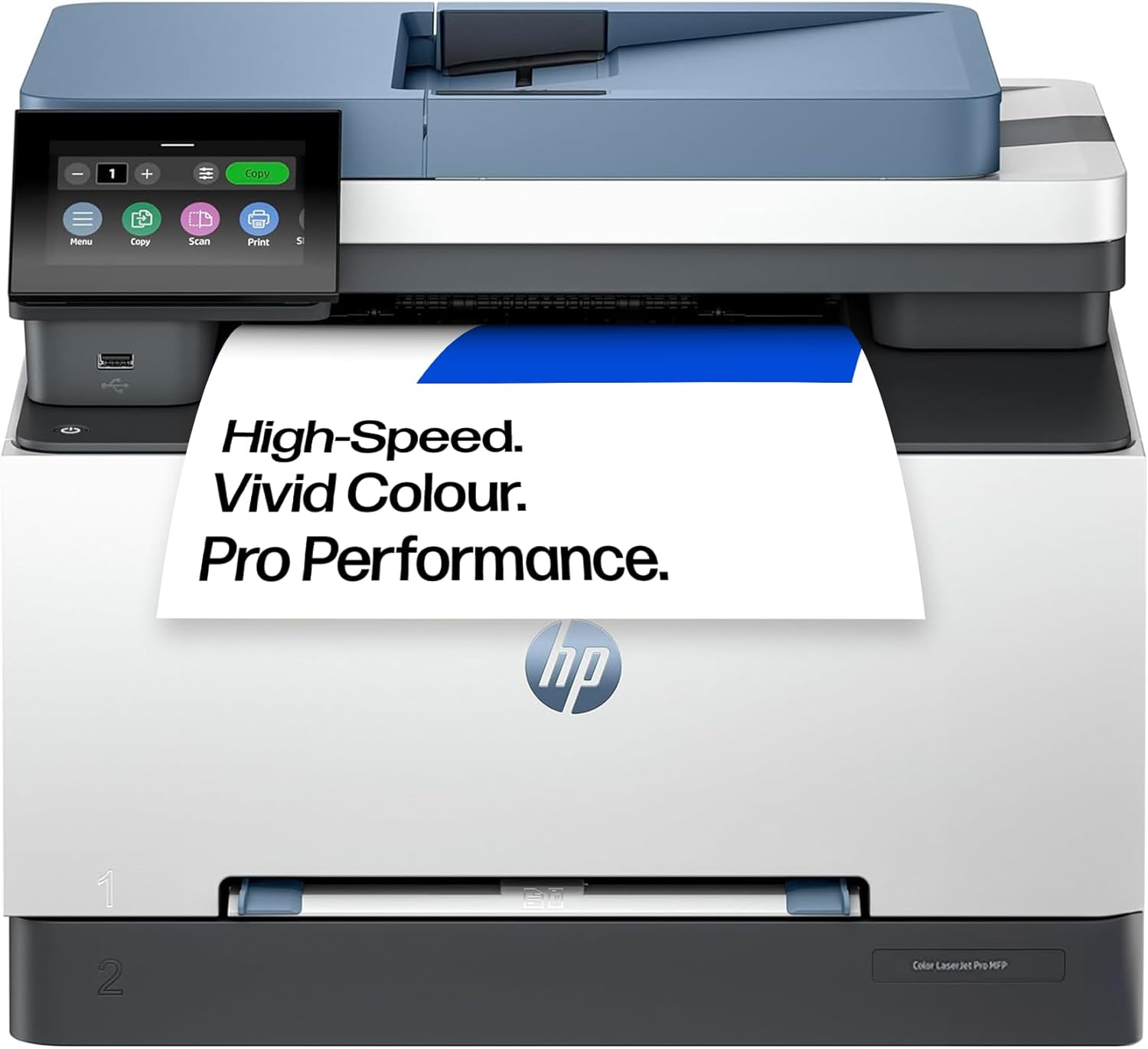
The colour all-in-one for a busy home office — capable and well proven, but four toners make colour laser dear to run.
Advantages
- Colour print, scan, copy and fax in one machine
- Around 25 ppm, with ADF and duplex
- Well proven at 4.2 stars over 631 ratings
- One device covers a full home-office workflow
Disadvantages
- Four toners make colour laser dear to run
- GBP 310 — the second-priciest here
- Overkill if you mostly print black text
The 3302fdw is the machine for a home office that genuinely needs colour and the full set of functions. It prints in colour, scans, copies and faxes, runs at about 25 pages a minute, and has the document feeder and duplex you expect at this level, with a solid 4.2 stars across more than six hundred ratings. As a single device that does everything, it is a lot of capability for GBP 310.
The cost to know about is the toner, and colour makes it steep: a colour laser has four cartridges — black plus cyan, magenta and yellow — and feeding all four is far dearer per page than a mono machine. That is the trade for colour laser, and it is why we rank it below the mono options for a typical home office that prints mostly black text.
Buy it if colour output, scanning and copying are all real needs and volume justifies the cartridges. If you only occasionally need colour, a mono laser plus the odd trip to a print shop is cheaper. Everything here comes from the Amazon listing rather than our own testing.
Brother HL-L3220CW Colour Wireless LED Printer, Single Function

The cheapest way into colour: a single-function colour LED printer, laser-class in how it works and what it costs to run.
Advantages
- Cheapest way into colour laser-class printing
- LED engine runs and costs like a laser, not inkjet
- Wireless; 4.2 stars over 406 ratings
- Good for colour documents without an all-in-one price
Disadvantages
- Single function — no scan or copy
- Four toners; colour costs more per page than mono
- No automatic double-sided printing
- Slower colour speed at ~18 ppm
If you want colour output without the all-in-one price, the HL-L3220CW is the cheapest route here. It is a single-function colour printer using LED technology, which works like a laser (a toner-and-drum machine, not inkjet) and costs like one to run, at GBP 190. It prints around 18 pages a minute in colour, connects wirelessly, and holds a fair 4.2 stars across 400-odd ratings.
Being single-function, it only prints — no scanning or copying — so it suits someone who specifically needs colour documents, presentations or the occasional photo-ish output rather than a full office workflow. Like any colour machine it feeds four toners, so the per-page cost sits above a mono printer even if the sticker is friendly.
It does not have the automatic double-sided printing some rivals here include, so check that if duplex matters to you. As the low-cost entry to colour laser, though, it earns its place. Everything here comes from the Amazon listing rather than our own testing.
Xerox B110 Wireless Mono Laser Printer, Compact A4 Desktop

A cheap, compact mono printer from a name you know — but a thin review pool and the usual toner caveat.
Advantages
- Compact A4 mono printer from an office-name brand
- Cheap sticker at GBP 79.99
- Wireless, around 20 ppm
- Small footprint for a tight desk
Disadvantages
- Only 47 ratings — thinly proven
- 4.0 stars, the lowest average of the established options
- Check toner cost; single-function only
The B110 is Xerox's compact entry mono printer, an A4 desktop machine at GBP 79.99 that prints at around 20 pages a minute over Wi-Fi. The Xerox name carries office pedigree, and for a small workspace that needs simple black-and-white printing it is a reasonable, low-footprint option.
Two things keep it mid-to-low here. First, evidence: at 4.0 stars over just 47 ratings it is far less proven than the Brother and HP machines with thousands of reviews, so there is little track record for reliability. Second, the running cost — as with any laser, check the Xerox toner price and yield before buying, because a cheap printer with dear toner is the trap this ranking keeps flagging.
Buy it if you specifically want a Xerox or need the compact size, and are comfortable with the thinner reviews. For a similar price the Brother mono is cheaper to run and vastly better proven. Everything here comes from the Amazon listing rather than our own testing.
PANTUM BP4209DW Wireless Mono Laser Printer

Fast on paper and cheap toner is its selling point — but a 4.8 average on only 13 ratings is the least proven kind.
Advantages
- Cheap toner — Pantum's main selling point
- Fast at around 30 ppm with automatic duplex
- Wireless and simple
- Attractive cost of ownership on paper
Disadvantages
- Only 13 ratings — the least proven here
- A near-perfect score on a tiny sample is unreliable
- Little UK track record for support, drivers or parts
Pantum is a budget printer brand whose pitch is exactly the thing this ranking cares about: low-cost toner. The BP4209DW is a mono single-function printer that prints quickly at around 30 pages a minute over Wi-Fi with automatic double-sided printing, and Pantum's cartridges are among the cheapest to replace, which on paper makes the cost of ownership attractive.
The reason it sits ninth is evidence, not features. Its 4.8-star average is the highest on the page, but it rests on just 13 ratings — a near-perfect score on so tiny a sample is the least reliable kind there is, and Pantum has little long-term track record in the UK for support, drivers or parts. We do not mark a product down simply for being new, and if the cheap toner holds up it is genuinely good value; but against the deeply proven Brother and HP machines it is the bigger gamble.
Buy it for the low running cost if you are comfortable being an early adopter of a less-established brand. Everything here comes from the Amazon listing rather than our own testing.
Canon i-SENSYS MF664Cdw Wireless Colour Laser Multifunction Printer

A capable Canon colour all-in-one, and the priciest here — but with almost no reviews yet, it closes the ranking on trust, not features.
Advantages
- Colour print, scan and copy from a major imaging brand
- Full function set with document feeder and Wi-Fi
- Canon's established support network
Disadvantages
- Only 2 ratings — effectively no track record
- GBP 343, the most expensive here
- Four toners; high cost per colour page
- Better-proven colour all-in-ones cost less
The MF664Cdw is Canon's colour laser all-in-one, and on features it belongs with the premium machines: colour print, scan and copy, wireless, a document feeder, and Canon's respected imaging pedigree. At GBP 343 it is the most expensive printer in this ranking, aimed at a home office that wants colour and the full function set from a major brand.
It closes the page for one reason: proof. With just two ratings it has almost no track record on Amazon UK — too little to know how it performs and lasts for most buyers, which is a real hesitation on a GBP 343 purchase. We do not reject a product for being new, and Canon's support is established, but at this price the better-evidenced HP colour all-in-one above it is the safer spend. And, being colour laser, it feeds four toners with the higher per-page cost that implies.
Buy it if you specifically want Canon colour and are comfortable being among the first reviewers. Everything here comes from the Amazon listing rather than our own testing.
All 10 compared
The same ranking side by side, now that the numbers have names.
| # | Product | Price | Amazon rating |
|---|---|---|---|
| 1 | Brother HL-L2400DWE Mono Laser Printer with EcoPro Subscription | £99.99 | 4.4 (5,641) |
| 2 | HP LaserJet M110w Wireless Black & White Printer | £74.97 | 4.1 (2,982) |
| 3 | HP LaserJet MFP M235sdw Mono Printer, Print/Scan/Copy | £145.94 | 4.5 (525) |
| 4 | Brother DCP-L2627DWE 3-in-1 Mono Laser Printer with EcoPro | £149.99 | 4.4 (148) |
| 5 | HP LaserJet M209dw Wireless Black & White Printer | £89.99 | 4.2 (591) |
| 6 | HP LaserJet Pro MFP 3302fdw Colour Laser Printer, Print/Scan/Copy/Fax | £310.00 | 4.2 (631) |
| 7 | Brother HL-L3220CW Colour Wireless LED Printer, Single Function | £189.99 | 4.2 (406) |
| 8 | Xerox B110 Wireless Mono Laser Printer, Compact A4 Desktop | £79.99 | 4.0 (47) |
| 9 | PANTUM BP4209DW Wireless Mono Laser Printer | £109.00 | 4.8 (13) |
| 10 | Canon i-SENSYS MF664Cdw Wireless Colour Laser Multifunction Printer | £343.31 | 4.5 (2) |
Final Verdict
Buy a laser printer on its toner, not its sticker. Check the replacement cartridge price and its page yield, remember that yield is quoted at 5 per cent coverage so your real total will be lower, and note that the cartridge in the box is often a half-filled starter. Only pay for colour if you genuinely print it — a colour laser has four toners to feed and a much higher cost per page. For most home offices the Brother HL-L2400DWE is the safe mono pick on cheap toner and overwhelming reviews; the HP M110w is the cheapest way to get printing if you print little; and if you need to scan and copy too, the HP M235sdw is the best-rated all-in-one here. Weigh the cartridge, not the box.
Why trust this ranking?
We rank on price, customer ratings and the specifications that decide the job, and we read each specification table against the marketing bullets on the same listing. When a number does not survive that check, we say so in the entry rather than quietly dropping the product. We also say when a product is the wrong one for you.
How we rank, in full
Written by
Felipe Iglesias
Founder & Lead Reviewer
Felipe is a computational engineering student who has been working in SEO since he was sixteen. He founded ranked10 and researches every guide on the site.
Related buying guides
Every guide below ranks ten products the same way this one does.
 Home & Office
Best Document Scanner 2026: 10 Ranked
The best document scanner for 2026 is the ScanSnap iX2500 White: £8.62 per page per minute, 100-sheet feeder. Nine more ranked, from £54.99.
 Home & Office
Best A3 Printer 2026: 10 Ranked
Best A3 printer for most offices: the Brother MFC-J5340DW at £185.90, where 28 ppm works out at £6.64 per page per minute.
 Home & Office
Best Wireless Keyboard and Mouse Combo 2026: 10 Ranked, Battery Claims Checked
Wireless keyboard and mouse combo picks from £16.89 — we flag the specs that contradict themselves, like a £23.32 set that says no batteries are needed.
 Home & Office
Best Gaming Desk 2026: 10 Ranked, and the Heights That Don't Add Up
Best gaming desk picks ranked: in the Bestier, tabletop thickness reads 91.5 cm — the same as its height. We check where the numbers disagree.
 Home & Office
Best Gaming Chairs 2026: 10 Ranked, Plus a 1,136 kg Capacity Claim
The £89.99 SONGMICS HOME gaming chair lists a 1,136 kg weight capacity. That is a base pressure test, not a limit. Ten gaming chairs ranked.
 Home & Office
Best Laptop Bag 2026: The Size That Is a Screen
Ten laptop bags: one says 15.6 inches in its title and 14.6 in its own fit field, two publish no bullets, and six borrow fields from clothing.
 Home & Office
Best Cable Management 2026: What the Piece Count Is Counting
Ten cable products: a 4m trunking sold as ten 400mm lengths counts as one piece, an 8-pair set counts as 24, and one sleeve is listed as screw-in.
 Home & Office
Best Safe 2026: The Box Weighs 1.87kg
Ten safes and lock boxes compared: three 6.6L boxes weigh 1.87kg, 2.04kg and 2.6kg, one lists Portable, and a 14L safe publishes no weight.
 Home & Office
Best Ergonomic Mouse 2026: Only Three Publish the Angle
Ten ergonomic mice compared: only three publish the vertical angle, one claims 8 minutes of battery, and a trackball has the best record.
 Home & Office
Best Whiteboard 2026: The Frame Eats 11 Per Cent
Ten whiteboards compared on the number most listings hide: the writing surface. A 90x60cm board gives you 86x56cm, and only three of ten say so.
Products you might like
The best rated products from our other Home & Office guides.
-
 BoYata Aluminium Adjustable Laptop Stand, 0-90 Degree, Foldable
£32.99
4.8
in Best Laptop Stand 2026: 10 Ranked on Height They Actually Reach
BoYata Aluminium Adjustable Laptop Stand, 0-90 Degree, Foldable
£32.99
4.8
in Best Laptop Stand 2026: 10 Ranked on Height They Actually Reach
-
 cocopar 15.6 Inch Portable Monitor, 1080p, 85% sRGB, 670g, VESA
£89.99
4.8
in Best Portable Monitor 2026: 10 Ranked on Colour and Brightness
cocopar 15.6 Inch Portable Monitor, 1080p, 85% sRGB, 670g, VESA
£89.99
4.8
in Best Portable Monitor 2026: 10 Ranked on Colour and Brightness
-
 cocopar 18.5 Inch Portable Monitor, 100Hz, 350 nits, 1080p, 1kg
£142.49
4.8
in Best Portable Monitor 2026: 10 Ranked on Colour and Brightness
cocopar 18.5 Inch Portable Monitor, 100Hz, 350 nits, 1080p, 1kg
£142.49
4.8
in Best Portable Monitor 2026: 10 Ranked on Colour and Brightness
-
 Amazon Basics Compact Laptop Shoulder Bag 15.6 inch, 7.1cm Deep
£13.95
4.7
in Best Laptop Bag 2026: The Size That Is a Screen
Amazon Basics Compact Laptop Shoulder Bag 15.6 inch, 7.1cm Deep
£13.95
4.7
in Best Laptop Bag 2026: The Size That Is a Screen
-
 Delamu Electric Cable Trunking 4M, Self-Adhesive Wall Trunking, 10 x 400mm
£12.99
4.7
in Best Cable Management 2026: What the Piece Count Is Counting
Delamu Electric Cable Trunking 4M, Self-Adhesive Wall Trunking, 10 x 400mm
£12.99
4.7
in Best Cable Management 2026: What the Piece Count Is Counting
-
 MATEIN Travel Laptop Backpack 15.6 inch with 12 Compartments
£17.96
4.7
in Best Laptop Bag 2026: The Size That Is a Screen
MATEIN Travel Laptop Backpack 15.6 inch with 12 Compartments
£17.96
4.7
in Best Laptop Bag 2026: The Size That Is a Screen
-
 Nulaxy Ergonomic Dual Foldable Laptop Stand, 10kg Load, 10-16 Inch
£16.99
4.7
in Best Laptop Stand 2026: 10 Ranked on Height They Actually Reach
Nulaxy Ergonomic Dual Foldable Laptop Stand, 10kg Load, 10-16 Inch
£16.99
4.7
in Best Laptop Stand 2026: 10 Ranked on Height They Actually Reach
-
 BoYata Height Adjustable Laptop Riser, 10-18.9cm, 5kg, 10-17 Inch
£24.99
4.7
in Best Laptop Stand 2026: 10 Ranked on Height They Actually Reach
BoYata Height Adjustable Laptop Riser, 10-18.9cm, 5kg, 10-17 Inch
£24.99
4.7
in Best Laptop Stand 2026: 10 Ranked on Height They Actually Reach
-
 ErGear Electric Standing Desk 140 x 70cm, 4 Memory
£139.99
4.7
in Best Electric Standing Desk 2026: 10 Ranked on Load and Speed
ErGear Electric Standing Desk 140 x 70cm, 4 Memory
£139.99
4.7
in Best Electric Standing Desk 2026: 10 Ranked on Load and Speed
-
 Nulaxy Pull-Out Height Adjustable Laptop Stand, 3-50.8cm, 10kg
£40.99
4.7
in Best Laptop Stand 2026: 10 Ranked on Height They Actually Reach
Nulaxy Pull-Out Height Adjustable Laptop Stand, 3-50.8cm, 10kg
£40.99
4.7
in Best Laptop Stand 2026: 10 Ranked on Height They Actually Reach
-
 BenQ ScreenBar Monitor Light Bar, 5W, Auto Dimming, 230-955 Lux
£89.00
4.7
in Best Monitor Light Bar 2026: 10 Ranked, and Why Lux Without an Area Is Nothing
BenQ ScreenBar Monitor Light Bar, 5W, Auto Dimming, 230-955 Lux
£89.00
4.7
in Best Monitor Light Bar 2026: 10 Ranked, and Why Lux Without an Area Is Nothing
-
 Desktronic HomeOne Dual Motor Standing Desk 120 x 60cm
£299.99
4.7
in Best Electric Standing Desk 2026: 10 Ranked on Load and Speed
Desktronic HomeOne Dual Motor Standing Desk 120 x 60cm
£299.99
4.7
in Best Electric Standing Desk 2026: 10 Ranked on Load and Speed
-
 LitONES LED Desk Lamp, 1200LM, 30 Lighting Modes, Metal Swing Arm
£53.25
4.8
in Best LED Desk Lamp 2026: 10 Ranked, and Why Lumens Are the Wrong Number
LitONES LED Desk Lamp, 1200LM, 30 Lighting Modes, Metal Swing Arm
£53.25
4.8
in Best LED Desk Lamp 2026: 10 Ranked, and Why Lumens Are the Wrong Number
-
 Jabra Speak 510 Speaker Phone - Microsoft Certified Portable Bluetooth Conference Speaker with USB - Connect with Laptops, Smartphones and Tablets, Black
£86.96
4.7
in Best Conference Speakerphone 2026: Ten Ranked on Real Mics and Honest Watts
Jabra Speak 510 Speaker Phone - Microsoft Certified Portable Bluetooth Conference Speaker with USB - Connect with Laptops, Smartphones and Tablets, Black
£86.96
4.7
in Best Conference Speakerphone 2026: Ten Ranked on Real Mics and Honest Watts
-
 SOUNDANCE 360 Rotating Laptop Stand, Adjustable Riser, 10-17 Inch
£19.28
4.7
in Best Laptop Stand 2026: 10 Ranked on Height They Actually Reach
SOUNDANCE 360 Rotating Laptop Stand, Adjustable Riser, 10-17 Inch
£19.28
4.7
in Best Laptop Stand 2026: 10 Ranked on Height They Actually Reach
Comments
Reader comments are not checked against the manufacturer's claims above.
No comments yet
Be the first to add something we missed — a price change, a spec that turned out wrong, or how one of these held up.
Leave a comment
No account needed. Own one of these? Tell other readers how it actually performed.