Best 3D Printers for Beginners 2026: 10 Ranked, and the Numbers That Don't Add Up
By Felipe Iglesias · Updated

Shopping for the best 3D printers for beginners means wading through numbers that sound confident. The loudest figure is usually the one the same listing quietly qualifies. QIDI advertises 16 colours; its own bullet says that needs the QIDI BOX. The Kobra X photographs show four spools of filament, and the note underneath says those rolls are display-only and not included. Meanwhile the star badges across these ten machines read 4.1 to 4.4 — until you count the one-star votes, which run from 7 to 14 in every 100 ratings.
We ranked ten of the best 3D printers for beginners on Amazon on four things that can actually be checked: what the listing promises against what the box contains, how much of the calibration is genuinely automatic, the price of the machine rather than the machine plus the extras, and what the one-star share says about the headline rating. Where a listing leaves out a basic number, we say so.
Bambu Lab P1S Combo with AMS, Enclosed

The strongest all-round case here — 4.4 stars from 725 ratings, with the AMS multi-colour unit already in the box at £499, so its 16-colour claim is one of the few on this page you don't buy twice.
Advantages
- 4.4 rating from 725 ratings, with 79 in every 100 giving five stars
- AMS multi-colour unit included at £499 — the 16-colour figure needs no extra purchase
- Fully enclosed body, listed as ideal for ABS and ASA and capable with PA and PC
- 500 mm/s and 20,000 mm/s² acceleration, with automatic bed levelling
- Setup quoted at 15 minutes
Disadvantages
- Carbon and glass fibre reinforced filaments are explicitly not recommended
- £499, almost three times the £169 A1 mini
- 21.55 kg and 38.9 x 45.8 x 38.9 cm — it needs a dedicated surface
- 10 in every 100 ratings are one star
Price aside, this is the only machine on the list with both a 4.4 badge and more than 700 ratings behind it. The listing claims 500 mm/s and 20,000 mm/s² acceleration, and for once the 16-colour headline is backed by hardware: the AMS is part of the Combo, not an add-on. Which means the number on the box and the number on the invoice agree — rare among the best 3D printers for beginners.
In practice the enclosure is the differentiator. The listing names PLA, PETG, TPU, PVA and PET as ideal, with ABS and ASA supported and PA and PC capable — filaments that hold up better in a closed, warm chamber. Setup is quoted at 15 minutes and bed levelling is automatic. At 38.9 x 45.8 x 38.9 cm and 21.55 kg it needs a proper table, not a shelf.
That said, carbon and glass fibre reinforced polymers are explicitly not recommended, so this is not the machine for anyone chasing stiff engineering parts. And £499 is almost three times the £169 A1 mini two places below. If you print PLA models and nothing else, you are paying for a door and a lid: among the best 3D printers for beginners, this is the one where most of the money goes on the enclosure.
Bambu Lab A1 Combo with AMS lite + LED Lamp Kit

A £345 open-frame machine whose 10,000 mm/s² acceleration is half the figure quoted by the Bambu and FlashForge models around it, and whose 4.1 badge is the joint-lowest here.
Advantages
- AMS lite for multi-colour printing, plus automatic calibration and a 1-clip nozzle swap
- Active flow rate compensation quoted for consistent extrusion
- LED Lamp Kit included, for printing functional light models
- 4.1 rating from 228 ratings, with 72 in every 100 giving five stars
- Simplified touchscreen and a tool-free nozzle change
Disadvantages
- 10,000 mm/s² acceleration, half the 20,000 mm/s² quoted by the P1S, AD5X and AD5M
- 14 in every 100 ratings are one star — the highest share of the ten
- No enclosure, and the listing names no supported filaments
- 12.93 kg, with a listed 58.45 x 53.49 x 42.6 cm footprint
This is the joint-lowest rating on the list at 4.1, matched only by the £209 Adventurer 5M, and 14 in every 100 ratings are one star — the highest one-star share of the ten. The speed claim is careful: 10,000 mm/s² acceleration, where the P1S above and both FlashForge machines below quote 20,000 mm/s².
The AMS lite handles multi-colour, full-auto calibration covers Z-offset and bed levelling, and the listing adds active flow rate compensation plus a 1-clip quick-swap nozzle. The included LED Lamp Kit is an extra rather than a spec: you print lamp models and fit the supplied light. Note that the dimensions field reads 58.45 x 53.49 x 42.6 cm at 12.93 kg, a substantial footprint for an open-frame printer.
However, there is no enclosure, and the listing names no supported filaments at all, so advanced materials are undocumented rather than ruled out. With a 4.1 rating and a higher one-star share than most of the machines below it, this is an easy to use 3D printer that has not yet convinced everyone.
FlashForge AD5X, Four-Colour CoreXY

The fastest machine per pound near the top — 600 mm/s and 20,000 mm/s² for £299, with four colours from hardware that ships in the box.
Advantages
- 600 mm/s and 20,000 mm/s² — the same acceleration figures as the £499 P1S
- Four-colour filament system included, with auto loading and up to 4 kg auto-refill
- 300°C hotend and 32 mm³/s flow, listed for PLA, PETG, TPU and carbon fibre
- 220 x 220 x 220 mm build volume at £299
- 4.2 rating from 536 ratings
Disadvantages
- Real-time monitoring requires a camera kit bought separately
- 13 in every 100 ratings are one star
- 11 kg and a 36.3 x 37.6 x 41.3 cm body — not a shelf unit
- Aimed at batch production; the feature list is heavier than a first machine needs
Here the multi-colour claim survives scrutiny: the four colours come from an intelligent filament system included in the build, with auto loading, auto unloading and up to 4 kg auto-refill, not from optional add-ons. That is why it sits third — 4.2 from 536 ratings, 600 mm/s and 20,000 mm/s² at £299. It earns its place among the best 3D printers for beginners on capability per pound rather than on simplicity.
The CoreXY frame, a 300°C hotend and 32 mm³/s flow are listed for PLA, PETG, TPU and carbon fibre, with a 220 x 220 x 220 mm build volume inside a 36.3 x 37.6 x 41.3 cm body weighing 11 kg. One-click levelling, vibration compensation, runout detection and power-loss resume are all quoted. By contrast with the two Bambu machines, this one is aimed at batch work: the listing talks about print farms and hundreds of printers under one account.
Worth noting, real-time monitoring needs a camera kit bought separately, so the full-control-from-your-phone line only holds once you add hardware. And 13 in every 100 ratings are one star. If you want a beginner 3D printer for a spare-room desk, £299 here buys a lot of machine you may never use.
Anycubic Kobra X, 4-Colour with App Control

The most-reviewed machine of the ten at 789 ratings and 4.2 stars, but its multi-colour ladder is the clearest example of a number you don't own yet.
Advantages
- Largest review sample of the ten: 4.2 from 789 ratings
- Native four-colour printing, expandable to 19 colours with four ACE units
- 45 dB quoted printing noise — the quietest figure on this list
- AI failure detection pauses the print and sends a phone alert
- Pre-assembled, with setup quoted at 15 minutes
Disadvantages
- The four filament rolls in the product photos are display-only and not included
- 19 colours needs four ACE units, sold separately
- Build volume given as 260mm3 — a volume figure rather than three dimensions
- 10 in every 100 ratings are one star
Two numbers in this listing need reading together. The machine prints in four colours natively, and the same bullet says it expands to 19 colours with 4 ACE units — hardware that is not in this price. Then there is the photograph: the note below the pictures states that the four rolls of filament shown are display-only and not included. Meanwhile the rating is solid, 4.2 from 789 ratings, the largest sample here.
In practice the appeal is software and noise. Setup is quoted at 15 minutes from a pre-assembled machine, printing runs at 45 dB, AI detection pauses the job if it spots a foreign object or a spaghetti failure and notifies your phone, and LeviQ 3.0 handles levelling. Speed is quoted at 600 mm/s. The build figure in the bullet is written as 260mm3 — a volume, not three dimensions.
Even so, 10 in every 100 ratings are one star, and the filament in the photos is not in the box. As an entry level 3D printer for a family room it is one of the quieter options here; if you want a machine that arrives with everything in the picture, this isn't it.
ELEGOO Centauri Carbon, Enclosed CoreXY

An enclosed CoreXY with a 256 x 256 x 256 mm build volume for £209, held back only by how little rating evidence exists behind it.
Advantages
- Enclosed chamber and a 256 x 256 x 256 mm build volume for £209
- 500 mm/s and 20,000 mm/s², with automatic vibration compensation
- Built-in chamber camera and dual LED lighting — no add-on kit needed
- 320°C hardened steel nozzle on a die-cast aluminium frame
- 8 in every 100 ratings are one star, the second-lowest share here
Disadvantages
- Only 42 ratings behind the 4.2 badge
- No four-star ratings at all in the 100 shown: 8 one, 6 two, 12 three, 74 five
- Little long-term evidence for a machine this new
- 17.5 kg — not something you move between rooms
The specification-to-price ratio here is the sharpest on the list: a full enclosure, a 256 x 256 x 256 mm build volume, 500 mm/s, 20,000 mm/s² and a 320°C brass-hardened steel nozzle, for £209. The 4.2 badge comes from just 42 ratings, though. That is the second-smallest sample among these ten, which is why it sits fifth rather than higher among the best 3D printers for beginners.
The frame is a single die-cast aluminium piece, which the listing credits for stability at speed, alongside automatic vibration compensation and a heated bed. A chamber camera and dual LED lighting are built in — a real difference from the £299 FlashForge, which asks you to add a camera kit. The dual-sided plate has a PLA-specific surface. The whole machine is 39.8 x 40.4 x 49 cm at 17.5 kg.
That said, look at the rating spread: of the 100 ratings shown, 8 are one star, 6 are two, 12 are three and 74 are five — there are no four-star ratings at all. With 42 reviews, one unhappy buyer moves the average. If you want a long track record before spending, this is not it.
FlashForge Adventurer 5M, 220 mm Cube

The same 600 mm/s and 20,000 mm/s² as the AD5X for £209, with one colour, no enclosure and the joint-lowest rating here at 4.1.
Advantages
- 600 mm/s and 20,000 mm/s² for £209
- Full-auto one-click levelling with vibration compensation on a CoreXY frame
- 32 mm³/s flow, 50W hotend and 200°C reached in 35 seconds
- Four nozzle sizes supported: 0.25, 0.4, 0.6 and 0.8 mm
- 4.1 rating from 489 ratings
Disadvantages
- No enclosure — the listing suggests customising one yourself
- 14 in every 100 ratings are one star, joint-highest here
- Single colour, where the four-colour AD5X costs £90 more
- The same 220 mm cube as the AD5X, so no gain in build volume
The AD5M shares its speed figures with the £299 AD5X above — 600 mm/s and 20,000 mm/s² — along with 32 mm³/s flow, a 50W hotend and a 200°C heat-up in 35 seconds. What it does not share is the four-colour system or the enclosure. The build volume is 220 x 220 x 220 mm inside a 40 x 36.3 x 44.8 cm frame weighing 10.6 kg.
Full-auto one-click levelling runs with vibration compensation on a CoreXY structure, and the quick-release nozzle and flexible PEI steel plate make maintenance straightforward. Nozzles swap between 0.25, 0.4, 0.6 and 0.8 mm. Crucially, the listing tells you to customise the enclosure yourself — there isn't one in the box, so draughts and dust are your problem.
The catch is the record: 4.1 is the joint-lowest badge here, and 14 in every 100 ratings are one star. At the same price, the enclosed Centauri Carbon offers a 320°C nozzle and a camera, with far fewer reviews. It is a budget 3D printer for beginners on price; it just isn't the most forgiving one on this list.
Weefun TINA2C, Assembled for Kids and Beginners

The cheapest fully assembled machine here at £179.99, pitched at children and absolute starters — and the one listing that never states a build volume.
Advantages
- Arrives fully assembled with factory-preset auto levelling
- Starter kit includes PLA filament, tools, magnetic build plate and TF card
- 2.45 kg and 17 x 21 x 25 cm — small enough for a desk
- 3,000+ models in the app, one-tap printing and AIGC photo-to-model
- 4.2 rating from 498 ratings
Disadvantages
- No build volume, print speed or nozzle temperature stated anywhere in the listing
- 13 in every 100 ratings are one star
- Small format, so small models only
- The model library and AIGC features depend on the app
There is no build volume anywhere in this listing, no speed figure and no nozzle temperature. What it does give you is 498 ratings at 4.2, a 2.45 kg machine measuring 17 x 21 x 25 cm, and a starter kit in the box: a spool of PLA, tools, a magnetic build plate and a TF card holding test models. For a 3D printer for kids, arriving assembled and preset matters more than a specification sheet.
In practice the app does the work. The listing quotes 3,000+ ready-to-print models updated weekly, one-tap printing from a phone or tablet, 20+ design modules for STEM projects, and an AIGC function that turns a photo into a model. Wiibuilder and Cura are both supported if you would rather slice on a PC, and prints can go over wifi, TF card or USB-C. Silent printing, bed detection and resume-after-pause cover the safety basics.
That said, 13 in every 100 ratings are one star, and the small footprint that makes it a sensible first 3D printer also means small prints — you will not be making helmets on it. Pick it for a child's desk or a kitchen table; skip it if you already know you want a 256 mm build plate. It is the only machine among the best 3D printers for beginners here that never commits to a build volume at all.
Bambu Lab A1 mini + LED Lamp Kit

The lowest price here at £169 and the lowest one-star share at 7 in every 100, from a listing that also names no build volume and no print speed.
Advantages
- 4.4 rating from 167 ratings — the joint-highest badge on the list
- 7 in every 100 ratings are one star, the lowest share here
- £169, the cheapest machine in the ranking
- Automatic calibration, MakerWorld library and Bambu Handy app support
- 5.5 kg, the second-lightest of the ten
Disadvantages
- No build volume, print speed or acceleration stated in the listing
- 167 ratings is a smaller sample than the £209 to £299 machines
- No enclosure in this configuration
- Multi-colour printing is not part of this bundle
Two of the strongest numbers on this page belong to the cheapest machine: 4.4 stars, level with the £499 P1S, and just 7 one-star ratings in every 100 — the cleanest record of the ten. The badge rests on 167 ratings, so it is a smaller sample than the machines around it.
What you actually buy is the Bambu ecosystem. Automatic calibration, the MakerWorld model library and the Bambu Handy app are the pitch, and the included LED Lamp Kit lets you print lamp models and fit the supplied light. The listing is notably quiet on hardware — no build volume, no print speed, no acceleration figure. At 5.5 kg and a listed 38.63 x 42.6 x 45.57 cm, it is the lightest machine here apart from the 2.45 kg Weefun.
However, quiet specifications cut both ways: you cannot compare it on numbers because it publishes none. As a best beginner 3D printer for someone who wants to print downloaded models rather than tune a machine, the rating record argues for it. If you need to know the build volume before you buy, this listing will not tell you.
FlashForge Creator 5 Pro, Four Toolheads

The most capable and most expensive machine here at £748.99 — four toolheads, a 65°C heated chamber and no published build volume.
Advantages
- Four preloaded, preheated toolheads with a 7-second toolchange
- 65°C actively heated chamber and a 320°C hardened nozzle
- Enclosed CoreXY build aimed at engineering materials
- 4.2 rating from 652 ratings
- Flow Dynamics Calibration compensates as the nozzle wears
Disadvantages
- No build volume published in the listing
- 13 in every 100 ratings are one star
- 14 kg and 44.09 x 41.1 x 46 cm — a workshop footprint
- £748.99 buys capability most first-time buyers will not use
This is a different class of machine, and the ranking reflects it: £748.99 buys four preloaded, preheated toolheads with a 7-second swap, so material changes happen without purging. The 65°C actively heated chamber and 320°C hardened nozzle are aimed at engineering filaments. The 4.2 badge comes from 652 ratings, a bigger sample than either Bambu A1 manages.
The mechanism is the point. Instead of loading and unloading one filament, four independent toolheads switch automatically, with support listed for PLA, PETG, TPU, ABS and PVA among others. An adaptive airflow system refreshes the chamber with cool air so low-temperature filaments like PLA set at the right moment, while the heated chamber holds uniform heat for engineering materials. Flow Dynamics Calibration models extrusion as a non-linear system to compensate for wear.
That said, the listing publishes no build volume, and 13 in every 100 ratings are one star. At 14 kg and 44.09 x 41.1 x 46 cm it is a workshop machine, not a desk one. For most beginners this is more than four times the money for capability they will not use — which is exactly why it sits ninth on a list of the best 3D printers for beginners.
QIDI Q2 with 65°C Heated Chamber
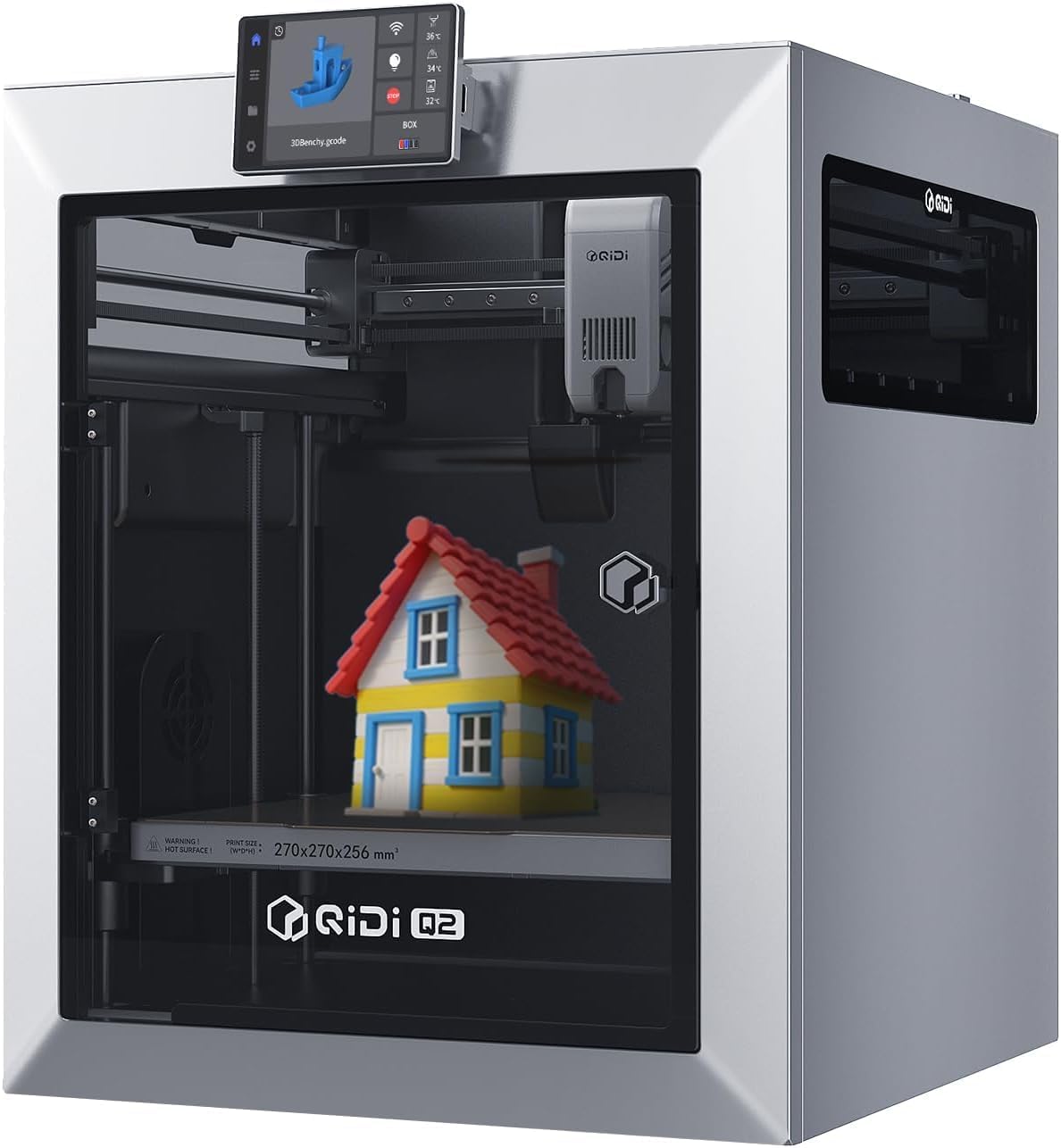
A 4.4 badge on the smallest sample here — 24 ratings — attached to the hottest specification of the ten: 370°C nozzle, 65°C chamber and 600 mm/s.
Advantages
- 4.4 rating, joint-highest on this list
- 370°C high-temp nozzle and a 65°C actively heated chamber
- Full-metal CoreXY frame with precision linear rails and 600 mm/s
- Triple filtration: G3 pre-filter, H12 HEPA and activated carbon
- Nozzle acts as the levelling sensor for first-layer accuracy
Disadvantages
- Only 24 ratings behind the 4.4 badge — the smallest sample of the ten
- 16 colours require the QIDI BOX, sold separately
- 23.5 kg and a 52 x 48 x 58 cm footprint
- No two-star or four-star ratings at all in the 100 shown
The rating is level with the P1S at 4.4, but it rests on 24 ratings rather than 725, which is why a machine with a 370°C nozzle and a 65°C heated chamber finishes tenth. The three buckets shown are telling: 8 one-star, 13 three-star and 79 five-star — no two-star and no four-star ratings at all.
On paper it out-specs almost everything above it. A full-metal CoreXY frame with precision linear rails, 600 mm/s, a 370°C high-temp nozzle for materials like PPS-CF, and a second-generation PTC heated chamber holding 65°C to limit warping. The nozzle doubles as the levelling sensor, so first-layer accuracy does not depend on the bed surface. A triple filtration system — G3 pre-filter, H12 HEPA and activated carbon — addresses fumes, and the chamber is flame-retardant.
The catch is the colour claim. Sixteen colours require the QIDI BOX, which is not in this £429 price; the machine on its own prints one material at a time. Add 23.5 kg, a 52 x 48 x 58 cm footprint and the smallest review base here, and this is a machine for someone who has already decided they need a 65°C chamber — not a first purchase.
All 10 compared
The same ranking side by side, now that the numbers have names.
1
2
3
4
5
6
7
8
9
10
| # | Product | Price | Amazon rating |
|---|---|---|---|
| 1 | Bambu Lab P1S Combo with AMS, Enclosed | £499.00 | 4.4 (725) |
| 2 | Bambu Lab A1 Combo with AMS lite + LED Lamp Kit | £345.00 | 4.1 (228) |
| 3 | FlashForge AD5X, Four-Colour CoreXY | £299.00 | 4.2 (536) |
| 4 | Anycubic Kobra X, 4-Colour with App Control | £279.99 | 4.2 (789) |
| 5 | ELEGOO Centauri Carbon, Enclosed CoreXY | £209.00 | 4.2 (42) |
| 6 | FlashForge Adventurer 5M, 220 mm Cube | £209.00 | 4.1 (489) |
| 7 | Weefun TINA2C, Assembled for Kids and Beginners | £179.99 | 4.2 (498) |
| 8 | Bambu Lab A1 mini + LED Lamp Kit | £169.00 | 4.4 (167) |
| 9 | FlashForge Creator 5 Pro, Four Toolheads | £748.99 | 4.2 (652) |
| 10 | QIDI Q2 with 65°C Heated Chamber | £429.00 | 4.4 (24) |
Final Verdict
For most homes, the £499 Bambu Lab P1S Combo is the safest buy here: 4.4 stars from 725 ratings, an enclosed body, and the AMS multi-colour unit included rather than sold on top. If you want the cheapest route into the best 3D printers for beginners, the £169 A1 mini carries the lowest one-star share on the list at 7 in every 100, though you give up the enclosure and any published build volume. Families should look at the £179.99 Weefun Tina2C, which arrives assembled at 2.45 kg, and anyone who needs a 65°C chamber or a 370°C nozzle should read the QIDI Q2 and Creator 5 Pro entries before spending four figures. Either way, treat a 16-colour headline as a shopping list rather than a feature: the best 3D printers for beginners are the machines whose numbers survive the second paragraph of their own listing.
Why trust this ranking?
We rank on price, customer ratings and the specifications that decide the job, and we read each specification table against the marketing bullets on the same listing. When a number does not survive that check, we say so in the entry rather than quietly dropping the product. We also say when a product is the wrong one for you.
How we rank, in full
Written by
Felipe Iglesias
Founder & Lead Reviewer
Felipe is a computational engineering student who has been working in SEO since he was sixteen. He founded ranked10 and researches every guide on the site.
Related buying guides
Every guide below ranks ten products the same way this one does.
 Tech
Tech
Best Mini Projector 2026: 10 Ranked
The best mini projector here is the XuanPad 40000L at £129.99: native 1080p and Netflix built in. We rank 10 and compare the real ANSI lumens.
 Tech
Tech
Best Gaming Motherboard 2026: 10 Ranked
Best gaming motherboard 2026: the £127.99 ASUS TUF Gaming B650-Plus WiFi wins with 14 power stages at £9.14 each, half the £16.22 a stage of a dearer board.
 Tech
Tech
Best Floorstanding Speakers 2026: 10 Ranked
Best floorstanding speakers 2026: the Q Acoustics 3050i wins with two 165 mm drivers per tower, and the Fenton SHF700B pair costs £159.90.
 Tech
Tech
Best Binoculars 2026: 10 Ranked
The best binoculars for 2026 ranked: the £25.99 Kylietech 12x42 gives a 3.5 mm exit pupil, nearly three times the light of the £34.99 occer 12x25.
 Tech
Tech
Best Camcorder 2026: 10 Ranked
The best camcorder for most buyers is the FIREFOTO 4K 64MP at £59.99, working out at £0.94 a megapixel against £2.49 on the 8K PITIKI.
 Tech
Tech
Best OLED Gaming Monitor 2026: 10 Ranked, Brightness Listed Four Ways
The best OLED gaming monitor picks ranked by panel, refresh rate and price — brightness is listed four different ways across these listings.
 Tech
Tech
Best 128GB SD Cards 2026: 10 Ranked, and Three Adverts That Contradict Themselves
Every 128GB SD card here leads with read speed. Three listings contradict their own specs — we show you both numbers before you buy.
 Tech
Tech
Best DAB Radios 2026: 9 Ranked, and the 30W Claim That Doesn't Add Up
The best DAB radios compared: one claims 30W yet a 2,000mAh battery lasting 10 hours — that averages 0.74W. Nine models ranked on their own figures.
 Tech
Tech
Best CPU Air Cooler 2026: 10 Ranked, One Sold Twice at Two Prices
We ranked the best CPU air cooler picks on Amazon, including the same Peerless Assassin 120 SE listed twice at £29.99 and £35.90.
 Tech
Tech
Best Case Fans 2026: 9 Ranked by What a Fan Actually Costs
The best case fans are rarely sold singly: a £21.49 five-pack is £4.30 a fan, while £18.99 buys one. Nine ranked by cost per fan and quoted noise.
Products you might like
The best rated products from our other Tech guides.
-
Noctua NF-P12 redux-1700 PWM 120mm Quiet Fan
£12.95
4.8
in Best Case Fans 2026: 9 Ranked by What a Fan Actually Costs
-
 WD_BLACK SN850X 4TB NVMe SSD
£499.99
4.8
in Best 4TB SSD for PS5: 10 Ranked, and the Speed Numbers That Don't Add Up
WD_BLACK SN850X 4TB NVMe SSD
£499.99
4.8
in Best 4TB SSD for PS5: 10 Ranked, and the Speed Numbers That Don't Add Up
-
 Canon EF 50mm f/1.8 STM
£129.00
4.8
in Best 50mm Lens 2026: 10 Ranked, Spec Sheets Cross-Checked
Canon EF 50mm f/1.8 STM
£129.00
4.8
in Best 50mm Lens 2026: 10 Ranked, Spec Sheets Cross-Checked
-
Noctua NH-D15 Dual Tower CPU Cooler
£99.95
4.8
in Best CPU Air Cooler 2026: 10 Ranked, One Sold Twice at Two Prices
-
 Corsair MP600 PRO LPX 4TB PS5 SSD
£415.01
4.8
in Best 4TB SSD for PS5: 10 Ranked, and the Speed Numbers That Don't Add Up
Corsair MP600 PRO LPX 4TB PS5 SSD
£415.01
4.8
in Best 4TB SSD for PS5: 10 Ranked, and the Speed Numbers That Don't Add Up
-
 CTEK MXS 5.0 5A Battery Charger with Temperature Compensation
£74.49
4.8
in Best Car Battery Charger 2026: 10 Ranked, and Two Share a Model Number
CTEK MXS 5.0 5A Battery Charger with Temperature Compensation
£74.49
4.8
in Best Car Battery Charger 2026: 10 Ranked, and Two Share a Model Number
-
 JBL Charge 6 Portable Bluetooth Speaker, 24H, Built-in Powerbank
£159.00
4.8
in Best Bluetooth Speaker 2026: 10 Portable Speakers Ranked
JBL Charge 6 Portable Bluetooth Speaker, 24H, Built-in Powerbank
£159.00
4.8
in Best Bluetooth Speaker 2026: 10 Portable Speakers Ranked
-
 Acer Predator GM7 1TB NVMe Gen4
£155.99
4.8
in Best 1TB SSD for PS5: 10 Ranked, From £135.99 to £199.99
Acer Predator GM7 1TB NVMe Gen4
£155.99
4.8
in Best 1TB SSD for PS5: 10 Ranked, From £135.99 to £199.99
-
Acer Predator GM7 2TB SSD, Gen4 NVMe 2.0, 7200MB/s, Graphene Thermal Pad
£228.99
4.8
in Best 2TB SSD for PS5 in 2026: 10 Ranked Against Sony’s Own Rules
-
 Wharfedale Diamond 9.1 Bookshelf Speakers (Pair, Walnut)
£129.00
4.8
in Best Bookshelf Speakers 2026: 10 Ranked, From £94.99
Wharfedale Diamond 9.1 Bookshelf Speakers (Pair, Walnut)
£129.00
4.8
in Best Bookshelf Speakers 2026: 10 Ranked, From £94.99
-
 WD Elements 1TB Portable Hard Drive
£93.00
4.7
in Best 1TB External Hard Drive 2026: 10 Ranked, and the 625 MB/s Myth
WD Elements 1TB Portable Hard Drive
£93.00
4.7
in Best 1TB External Hard Drive 2026: 10 Ranked, and the 625 MB/s Myth
-
WD 2TB Elements Portable External Hard Drive
£99.99
4.7
in Best 2TB External Hard Drive: 8 Ranked, and the Speeds That Don't Add Up
-
 Crucial BX500 1TB 2.5" SATA SSD
£149.99
4.7
in Best 1TB SATA SSD: 10 Ranked, and Why £190 Buys 10MB/s
Crucial BX500 1TB 2.5" SATA SSD
£149.99
4.7
in Best 1TB SATA SSD: 10 Ranked, and Why £190 Buys 10MB/s
-
 soundcore Anker 2 Portable Bluetooth Speaker, 12W Stereo, IPX7, 24H
£28.49
4.7
in Best Bluetooth Speaker 2026: 10 Portable Speakers Ranked
soundcore Anker 2 Portable Bluetooth Speaker, 12W Stereo, IPX7, 24H
£28.49
4.7
in Best Bluetooth Speaker 2026: 10 Portable Speakers Ranked
-
 SanDisk 512GB Extreme microSD Card + Adapter
£109.00
4.7
in Best 512GB MicroSD Card 2026: 10 Ranked, and Why Read Speed Misleads
SanDisk 512GB Extreme microSD Card + Adapter
£109.00
4.7
in Best 512GB MicroSD Card 2026: 10 Ranked, and Why Read Speed Misleads
Comments
Reader comments are not checked against the manufacturer's claims above.
No comments yet
Be the first to add something we missed — a price change, a spec that turned out wrong, or how one of these held up.
Leave a comment
No account needed. Own one of these? Tell other readers how it actually performed.