Best E Ink digital notebook 2026: 10 ranked, from £326 to £722.99
By Felipe Iglesias · Updated

Two Amazon listings for the same iFLYTEK AINOTE 2 sit at exactly £521 each, and they cannot agree on what the machine is. One describes the 10.65-inch e ink digital notebook as 4.2 mm thin and 295 g light; the other lists it at 0.6 cm and 789 g. That is a 494 g gap between two pages for one device. The same £521 pair credits one with 111 days of battery life and the other with a 4000 mAh cell that 'powers all-day use'. It is not a one-off. A BOOX Go 7 spec table says 400 g while its own bullet says approximately 195 g. Meanwhile the most expensive device in this guide, the £722.99 BOOX Go 10.3 Gen II, lists a battery average life of '1 days'.
We ranked ten of the best e ink digital notebook listings on Amazon on four things you can check yourself: the price you actually pay, whether the spec table matches the description printed above it, the screen size and resolution, and how many ratings sit behind the score. Where a listing contradicts itself, we print both numbers and say which one we would trust. Where the numbers agree, we say that too.
reMarkable Paper Pure with Marker Plus and Folio

Top of the list on 4.4 from 150 ratings, and the only 10.3-inch e ink digital notebook here that publishes both its weight and its battery life without contradicting itself.
Advantages
- 4.4 from 150 ratings, with a 73% five-star share
- 360 g, which reMarkable compares to a good paper notebook
- Ranked 2nd in Amazon's eWriters category
- Digital ink latency quoted at 21 ms
- Bundle includes Marker Plus with built-in eraser and an Ocean Blue sleeve folio
Disadvantages
- Black-and-white display only — no colour and no front light listed
- 5% one-star ratings against 73% five-star, so the spread is wide
- The 360 g figure appears in the copy only; the spec table has no weight field
- £439 buys a black-and-white panel when £10 less buys a colour one from Penstar
73% of its 150 ratings are five-star and 5% are one-star, and its rank of 2nd in Amazon's eWriters category is the strongest reviewer signal in this list. The 10.3-inch panel is black and white only, with digital ink appearing in 21 ms according to the listing. The bundle adds Marker Plus with a built-in eraser and the Ocean Blue sleeve folio.
At 360 g, reMarkable compares it to a good paper notebook, and that is the practical case for a paper tablet: you carry it and stop thinking about it. The 10.3-inch screen matches the Penstar and BOOX 10.3s, so PDF markup, templates and split-screen reading behave the same way. Crucially, the black-and-white panel is the trade you accept — no colour option and no front light are listed anywhere on this page.
That said, the 360 g figure lives in the bullet copy only. The spec table has no Item Weight field at all, so there is nothing official to check it against. Skip this one if colour matters: the £429 Penstar eNote Pro Color offers a colour panel for £10 less, and the £439 Paper Pro Move matches this price on a smaller 7.3-inch screen. If you need an open app store or a keyboard case, this page names reMarkable OS, Wi-Fi and a stylus and nothing else.
Penstar eNote 2 10.3" E Ink Tablet with Pen and Folio

The cheapest e ink digital notebook in this list at £326, with 300 PPI, 128 GB storage and a 6500 mAh battery quoted at two weeks.
Advantages
- £326 — the lowest price of any device in this list
- 128 GB storage, 4 GB RAM and an octa-core 2.2 GHz processor
- 8,192 pressure levels with a stylus that needs no charging
- 2480 × 1860 at 300 PPI on a 10.3-inch screen
- Bundle includes two pens, a leather folio and 10 spare nibs
Disadvantages
- Called eNote 2 in the title and 'eNote Pro' in the body copy
- Two-week battery claim with no mAh figure in the spec table
- Grey finish only
- 5% of its 120 ratings are one-star
At £326 the eNote 2 is the cheapest e ink digital notebook here — £103 under the colour Penstar and £213 under the iFLYTEK — and it still lists 128 GB of storage, 4 GB of RAM and an octa-core 2.2 GHz processor. The 10.3-inch panel runs 2480 × 1860 at 300 PPI with 8,192 pressure levels, and 120 ratings average 4.3.
Penstar says it removed the capacitive touch layer to cut haze and refraction, bringing the ink closer to the surface. That is a real technique on an e ink writing tablet, and it explains why the bundle leans on a stylus that needs no charging and nine customisable buttons as well as touch. In practice, 128 GB is double what the £521 iFLYTEK and the £722.99 BOOX offer.
The catch is the paperwork. The title says eNote 2; the fifth bullet calls it an 'eNote Pro paper tablet' bundle, and the box contents list two B5 pens that the model name never mentions. The two-week battery figure is stated with no mAh figure anywhere in the spec table. Buyers considering colour should note the £429 eNote Pro Color quotes the identical 2480 × 1860 at 300 PPI.
reMarkable Paper Pro Move with Marker Plus
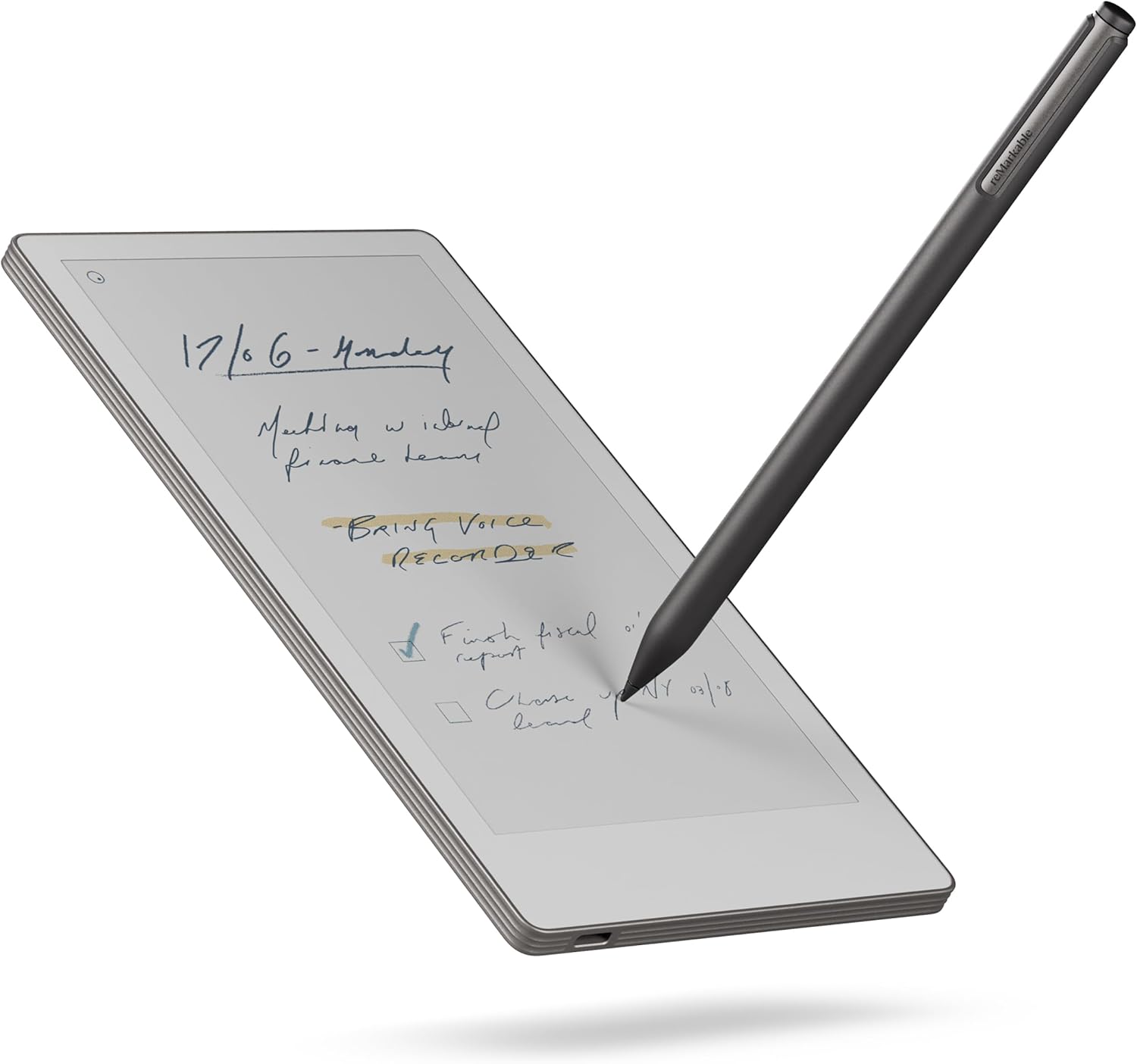
The lightest device here at 248 g and the cheapest colour reMarkable at £439 — but 16% of its ratings are one-star, the highest share in this list.
Advantages
- 248 g and 7.3 inches — the lightest and smallest in this list
- Colour Canvas display at 954 × 1696
- £439, the same price as the larger black-and-white Paper Pure
- 290 ratings, the largest review sample here
Disadvantages
- 4.1 average — the lowest of the top four
- 16% of ratings are one-star, the highest share in this list
- Searching handwritten notes needs a Connect subscription
- No folio in this box; the leather bundle costs £529
At 7.3 inches and 248 g the Paper Pro Move is the smallest and lightest device in this list. It runs a colour Canvas display at 954 × 1696, and it costs the same £439 as the far larger, black-and-white 10.3-inch Paper Pure. Its 290 ratings are the largest sample here, and the average is 4.1.
The size is the whole argument. reMarkable sells it as a digital paper tablet that fits a jacket pocket, and 954 × 1696 across 7.3 inches lands at roughly paperback proportions. In theory that makes it the one you actually carry. In practice it costs you three inches of diagonal against every 10.3-inch rival, so this is a colour-and-portability trade rather than a cheap option.
However, 16% of its 290 ratings are one-star — more than any other device in this list, and the reason the average sits at 4.1 rather than 4.4. Searching inside handwritten notes requires a Connect subscription, according to the listing. The folio is not included either; that is the £529 version. If you want a large writing surface, the £439 Paper Pure is the same money.
reMarkable Paper Pro Move with Marker Plus and Leather Folio

The same 7.3-inch colour Paper Pro Move as the £439 model, with the black leather Book Folio added for exactly £90 more.
Advantages
- Includes the premium black leather Book Folio
- Stated 2nd generation, 2025 model year and one-year limited warranty
- 4.2 from 159 ratings, up from 4.1 on the folio-free version
- Same 7.3-inch colour Canvas display and reading light
Disadvantages
- £529 — exactly £90 more than the identical tablet without the folio
- 159 ratings, roughly half the sample of the cheaper version
- Still 7.3 inches, not the 10.3-inch writing area of the Paper Pure
- The folio is the only difference; the tablet itself is unchanged
This is the same 7.3-inch colour Paper Pro Move, paired with the premium black leather Book Folio. The gap to the folio-free version is exactly £90 — £529 against £439 — and it lifts the published average from 4.1 across 290 ratings to 4.2 across 159.
The spec table adds what the cheaper listing leaves out: a stated 2nd generation, a 2025 model year, and a one-year limited warranty. It is still a 7.3-inch colour e ink tablet with a reading light rather than a 10.3-inch e ink notebook with a large writing surface, so screen area remains the compromise you accept.
By contrast with the £439 version, 9% of these 159 ratings are one-star against 16% of 290 — a narrower problem, but measured on a sample roughly half the size. Pay the extra only if you want the leather specifically. If you already own a folio or use a sleeve, the £90 buys a cover and nothing else.
VIWOODS AiPaper 10.65" AI E Ink Tablet Bundle

A 10.65-inch Carta 1300 panel at 300 PPI in a 370 g body — but just 49 ratings and a spec sheet that lists Windows as the operating system.
Advantages
- 10.65-inch Mobius Carta 1300 panel at 300 PPI and 2560 × 1920
- 370 g — lighter than any 10.3-inch device in this list
- 750 μm pen-to-ink distance, the only such figure here
- Bundle includes Stylus Pro, folio cover, five spare nibs and a USB-C cable
Disadvantages
- 49 ratings — the smallest sample in this list
- Operating system listed as Windows; connectivity listed as Bluetooth only
- No front light, so it needs room light or daylight
- 1024 pressure levels, level with the reMarkable 2 and far below 8,192
The AiPaper is the only 10.65-inch device here, and it weighs 370 g — lighter than every 10.3-inch machine in the top ten. Its Carta 1300 panel runs 2560 × 1920 at 300 PPI, and VIWOODS quotes a 750 μm pen-to-ink distance, the only measurement of its kind in this list. At £465.99 it sits between the £439 Paper Pure and the £521 iFLYTEK.
There is no front light, by design. VIWOODS says the screen is built for room or natural light, which keeps glare down but makes this e ink digital notebook a daytime device. The 1024 pressure levels are level with the reMarkable 2 and less than a quarter of the 8,192 the two Penstars claim. Meanwhile the bundle covers the basics: Stylus Pro, folio cover, five spare nibs and a USB-C cable.
Worth noting, the spec sheet lists the operating system as Windows and the connectivity as Bluetooth, with no Wi-Fi field anywhere — an odd pairing for a device whose AI tools summarise and translate documents. Only 49 people have rated it, the smallest sample here, so the 4.2 carries less weight than the reMarkable's 4.4 from 150 ratings. If you want a front light, the £349.99 AiPaper Mini and the Penstar eNote Pro Color both list one.
Penstar eNote Pro Color 10.3" E Ink Tablet with Pen

The cheapest colour e ink tablet here at £429, with an 8 MP camera and eight speakers — but 4.0 from 66 ratings, a joint-lowest average.
Advantages
- £429 — the cheapest colour e ink tablet in this list
- 10.3-inch Kaleido 3 panel with adjustable warm and cold light
- 8,192 pressure levels and 128 GB storage
- 8 MP camera and eight speakers — unique in this top ten
Disadvantages
- 4.0 from 66 ratings, a joint-lowest average here
- 10% of its ratings are one-star
- Quotes the same 2480 × 1860 and 300 PPI as the £326 black-and-white version
- Five customisable buttons against nine on the eNote 2
This is the cheapest colour e ink tablet in the list at £429, £10 under the black-and-white reMarkable Paper Pure. The 10.3-inch Kaleido 3 panel is quoted at 2480 × 1860 and 300 PPI with adjustable warm and cold reading light, and it carries an 8 MP camera and eight speakers — no other device in this top ten lists a camera at all.
For writing, the sheet is strong: 8,192 pressure levels, the same figure as the black-and-white Penstar, plus 128 GB of storage and a 6500 mAh cell quoted at two weeks. Crucially, the buttons drop from nine on the eNote 2 to five here, and the stylus changes from two B5 pens in that bundle to a single aluminium B6 stylus. The colour layer is what the extra £103 over the eNote 2 buys.
That said, 4.0 from 66 ratings is a joint-lowest average in this list, and 10% of those ratings are one-star. It also quotes the identical 2480 × 1860 at 300 PPI as the cheaper black-and-white version, which is the sort of pair of numbers worth putting side by side before paying a colour premium. If your work is text and PDFs, the grey eNote 2 does that job for £103 less.
BOOX Go 10.3 Gen II Lumi E Ink Tablet

The most expensive e ink digital notebook here at £722.99, and the one with the strangest spec table: 748 g, 0.4 cm thick and '1 days' of battery.
Advantages
- 10.3-inch panel at 2480 × 1860 and 300 PPI
- Adjustable front light, which the VIWOODS AiPaper lacks
- 4.2 from 62 ratings, with a 65% five-star share
- 64 GB storage, 4 GB RAM, Bluetooth and Wi-Fi
Disadvantages
- £722.99 — almost £194 more than any other device in this list
- Battery average life listed as '1 days'
- 748 g is heavier than every other device except the disputed 789 g iFLYTEK figure
- The whole description is one four-word bullet; a 748 g body in a 0.4 cm shell implies about 4.6 g/cm³
At £722.99 this is the most expensive device in this list, almost £194 more than the next one up. It gives you 64 GB of storage and 4 GB of RAM — the same RAM figure as the £326 Penstar — on a 10.3-inch black-and-white panel at 2480 × 1860 and 300 PPI.
Meanwhile, three numbers on its own spec sheet deserve a second look. Battery average life is listed as '1 days'. The weight is 748 g. And 22.9 × 17.8 × 0.4 cm describes a volume of about 163 cm³, which puts 748 g at roughly 4.6 g per cubic centimetre — denser than titanium. Either the weight or the thickness is wrong; both cannot be right.
The listing does give you an adjustable front light, which the £465.99 VIWOODS AiPaper does not, and it ships with a stylus. But the entire product description is a single four-word bullet — 'Go 10.3 Gen II Lumi' — so there is nothing else on the page to check those figures against. If you want a large e ink tablet, the AiPaper costs £257 less and publishes its 300 PPI resolution.
VIWOODS AiPaper Mini 8.2" E Ink Tablet Bundle

The lightest and second cheapest device here at 230 g and £349.99 — but 292 PPI is the lowest pixel density published in this list.
Advantages
- 230 g and 8.2 inches — the smallest and lightest in this list
- £349.99, second cheapest here
- 128 GB storage, double the £521 iFLYTEK and the £722.99 BOOX
- Adjustable front light, plus Bluetooth, USB and Wi-Fi
Disadvantages
- 292 PPI, the lowest published pixel density in this list
- 11% of ratings are two-star, the highest such share here
- 8.2-inch screen is smaller than every 10.3-inch or 10.65-inch rival
- 4.1 average, below the reMarkable Paper Pure and the Penstar eNote 2
230 g and 8.2 inches make this the smallest and lightest device in the list, and £349.99 makes it the second cheapest after the £326 Penstar. It carries 128 GB of storage — double the £521 iFLYTEK and the £722.99 BOOX — on a 1920 × 1440 panel quoted at 292 PPI.
That 292 PPI is the lowest density published here. Every 10.3-inch machine claims 300 PPI, and the reMarkable 2 does not publish a figure at all. In practice the gap is small on body text, but it is the one spec where this digital paper tablet trails instead of leads. The adjustable front light is a real advantage over the larger, frontlight-free AiPaper and the iFLYTEK.
The ratings tell you more than the average does. 11% of them are two-star, the highest two-star share in this list, and another 6% are one-star. So almost a quarter of buyers rate it three stars or below, even though the headline number is 4.1. If you need a 10-inch writing surface, this is not it.
reMarkable 2 with Marker Plus and Black Leather Folio

The 4.7 mm second-generation reMarkable at £448 — £9 more than the newer, lighter Paper Pure, with a folio described two different ways on one page.
Advantages
- 4.7 mm thick with a 10.3-inch display
- Includes Marker Plus with built-in eraser and nine spare tips
- Up to two weeks of battery life
- 103 ratings, 63% of them five-star
Disadvantages
- £448 — £9 more than the newer, lighter Paper Pure
- Folio called grey polymer weave in the copy and black premium leather in the spec table
- 13% of ratings are one-star, the highest share in this list
- Operating system listed as Windows; 1024 pressure levels, joint-lowest here
The reMarkable 2 is 4.7 mm thick with a 10.3-inch display and up to two weeks of battery life, priced at £448. That is £9 more than the newer Paper Pure, which weighs 360 g and claims three weeks. This older model costs more than the newer one.
The folio is where the page stops agreeing with itself. The bullet copy describes 'a protective cover in grey polymer weave'. The spec table below it lists 'Book Folio Premium Leather - Black'. Same box, two materials and two colours. Worth noting the model number is RM115 while the listed model name is 'reMarkable Essentials Bundle', so this is a bundle listing rather than a plain tablet.
That said, 13% of its 103 ratings are one-star — the highest one-star share in this list — which pulls the average down to 4.0. The display type is listed as 'eINK' at 1024 pressure levels, joint-lowest with the VIWOODS AiPaper, and the operating system is listed as Windows. If you want the lighter, longer-lasting reMarkable, the Paper Pure is cheaper at £439.
iFLYTEK AINOTE 2 10.65" AI E Ink Tablet

The strongest transcription here at 18 languages, on the largest screen — but 4.2 mm in the copy against 0.6 cm in the table, and roughly 225 PPI.
Advantages
- 18-language transcription — no other device here quotes a language count
- 10.65-inch display, the largest in this list
- 111 days of battery average life, as stated
- 64 GB storage, 4 GB RAM and stylus support
Disadvantages
- 4.2 mm in the bullet copy against 0.6 cm in the spec table
- 1440 × 1920 on 10.65 inches is roughly 225 PPI, the lowest here
- 4.0 from 42 ratings — the smallest sample and a joint-lowest average
- Frontlight-free display; AI and transcription features need Wi-Fi
The AINOTE 2 has the largest screen in this list at 10.65 inches and the smallest rating pool at 42. It is also the listing that started this article. One bullet puts it at 'approximately 4.2 mm in thickness'; the spec table further down the same page gives 19.3 × 13.7 × 0.6 cm and a weight of 789 g. The two thickness figures differ by 1.8 mm, and 789 g is more than double the 360 g the reMarkable claims.
Resolution is the next number to check. 1440 × 1920 across 10.65 inches works out at roughly 225 PPI — below the 292 PPI of the £349.99 AiPaper Mini and well under the 300 PPI every 10.3-inch rival claims. At the same time, this e ink digital notebook carries 18-language transcription and a stated 111 days of battery average life, which is what puts it in the top ten at all. Only the two Penstars offer voice-to-text nearby, and neither quotes a language count.
The catch is the ratings. 53% of its 42 reviews are five-star and the average is 4.0 — a joint-lowest figure with the Penstar eNote Pro Color and the reMarkable 2. The display is frontlight-free, so it is a daylight device, and the AI and transcription features need Wi-Fi. If you want a 10.65-inch screen with a published 300 PPI figure, the VIWOODS AiPaper costs £55.01 less.
All 10 compared
The same ranking side by side, now that the numbers have names.
1
2
3
5
6
7
8
9
10
| # | Product | Price | Amazon rating |
|---|---|---|---|
| 1 | reMarkable Paper Pure with Marker Plus and Folio | £439.00 | 4.4 (150) |
| 2 | Penstar eNote 2 10.3" E Ink Tablet with Pen and Folio | £326.00 | 4.3 (120) |
| 3 | reMarkable Paper Pro Move with Marker Plus | £439.00 | 4.1 (290) |
| 4 | reMarkable Paper Pro Move with Marker Plus and Leather Folio | £529.00 | 4.2 (159) |
| 5 | VIWOODS AiPaper 10.65" AI E Ink Tablet Bundle | £465.99 | 4.2 (49) |
| 6 | Penstar eNote Pro Color 10.3" E Ink Tablet with Pen | £429.00 | 4.0 (66) |
| 7 | BOOX Go 10.3 Gen II Lumi E Ink Tablet | £722.99 | 4.2 (62) |
| 8 | VIWOODS AiPaper Mini 8.2" E Ink Tablet Bundle | £349.99 | 4.1 (59) |
| 9 | reMarkable 2 with Marker Plus and Black Leather Folio | £448.00 | 4.0 (103) |
| 10 | iFLYTEK AINOTE 2 10.65" AI E Ink Tablet | £521.00 | 4.0 (42) |
Final Verdict
For most desks, the £439 reMarkable Paper Pure bundle is the safest e ink digital notebook here: 360 g, a claimed three-week battery and 4.4 from 150 ratings. If live transcription is the point, the £521 iFLYTEK AINOTE 2 covers 18 languages — but read its 4.2 mm against 0.6 cm problem first. Anyone who wants a digital notebook with stylus in the box for less should look at the £326 Penstar eNote 2, the cheapest 10.3-inch e ink digital notebook in this list at 300 PPI. For colour, the £429 Penstar eNote Pro Color is the cheaper way into a colour e ink tablet, though 4.0 from 66 ratings is the weakest top-six average here. In short, treat every spec table on this page as a claim, not a measurement.
Why trust this ranking?
We rank on price, customer ratings and the specifications that decide the job, and we read each specification table against the marketing bullets on the same listing. When a number does not survive that check, we say so in the entry rather than quietly dropping the product. We also say when a product is the wrong one for you.
How we rank, in full
Written by
Felipe Iglesias
Founder & Lead Reviewer
Felipe is a computational engineering student who has been working in SEO since he was sixteen. He founded ranked10 and researches every guide on the site.
Related buying guides
Every guide below ranks ten products the same way this one does.
 Tech
Tech
Best Mini Projector 2026: 10 Ranked
The best mini projector here is the XuanPad 40000L at £129.99: native 1080p and Netflix built in. We rank 10 and compare the real ANSI lumens.
 Tech
Tech
Best Gaming Motherboard 2026: 10 Ranked
Best gaming motherboard 2026: the £127.99 ASUS TUF Gaming B650-Plus WiFi wins with 14 power stages at £9.14 each, half the £16.22 a stage of a dearer board.
 Tech
Tech
Best Floorstanding Speakers 2026: 10 Ranked
Best floorstanding speakers 2026: the Q Acoustics 3050i wins with two 165 mm drivers per tower, and the Fenton SHF700B pair costs £159.90.
 Tech
Tech
Best Binoculars 2026: 10 Ranked
The best binoculars for 2026 ranked: the £25.99 Kylietech 12x42 gives a 3.5 mm exit pupil, nearly three times the light of the £34.99 occer 12x25.
 Tech
Tech
Best Camcorder 2026: 10 Ranked
The best camcorder for most buyers is the FIREFOTO 4K 64MP at £59.99, working out at £0.94 a megapixel against £2.49 on the 8K PITIKI.
 Tech
Tech
Best OLED Gaming Monitor 2026: 10 Ranked, Brightness Listed Four Ways
The best OLED gaming monitor picks ranked by panel, refresh rate and price — brightness is listed four different ways across these listings.
 Tech
Tech
Best 128GB SD Cards 2026: 10 Ranked, and Three Adverts That Contradict Themselves
Every 128GB SD card here leads with read speed. Three listings contradict their own specs — we show you both numbers before you buy.
 Tech
Tech
Best DAB Radios 2026: 9 Ranked, and the 30W Claim That Doesn't Add Up
The best DAB radios compared: one claims 30W yet a 2,000mAh battery lasting 10 hours — that averages 0.74W. Nine models ranked on their own figures.
 Tech
Tech
Best CPU Air Cooler 2026: 10 Ranked, One Sold Twice at Two Prices
We ranked the best CPU air cooler picks on Amazon, including the same Peerless Assassin 120 SE listed twice at £29.99 and £35.90.
 Tech
Tech
Best Case Fans 2026: 9 Ranked by What a Fan Actually Costs
The best case fans are rarely sold singly: a £21.49 five-pack is £4.30 a fan, while £18.99 buys one. Nine ranked by cost per fan and quoted noise.
Products you might like
The best rated products from our other Tech guides.
-
Noctua NF-P12 redux-1700 PWM 120mm Quiet Fan
£12.95
4.8
in Best Case Fans 2026: 9 Ranked by What a Fan Actually Costs
-
 WD_BLACK SN850X 4TB NVMe SSD
£499.99
4.8
in Best 4TB SSD for PS5: 10 Ranked, and the Speed Numbers That Don't Add Up
WD_BLACK SN850X 4TB NVMe SSD
£499.99
4.8
in Best 4TB SSD for PS5: 10 Ranked, and the Speed Numbers That Don't Add Up
-
 Canon EF 50mm f/1.8 STM
£129.00
4.8
in Best 50mm Lens 2026: 10 Ranked, Spec Sheets Cross-Checked
Canon EF 50mm f/1.8 STM
£129.00
4.8
in Best 50mm Lens 2026: 10 Ranked, Spec Sheets Cross-Checked
-
Noctua NH-D15 Dual Tower CPU Cooler
£99.95
4.8
in Best CPU Air Cooler 2026: 10 Ranked, One Sold Twice at Two Prices
-
 Corsair MP600 PRO LPX 4TB PS5 SSD
£415.01
4.8
in Best 4TB SSD for PS5: 10 Ranked, and the Speed Numbers That Don't Add Up
Corsair MP600 PRO LPX 4TB PS5 SSD
£415.01
4.8
in Best 4TB SSD for PS5: 10 Ranked, and the Speed Numbers That Don't Add Up
-
 CTEK MXS 5.0 5A Battery Charger with Temperature Compensation
£74.49
4.8
in Best Car Battery Charger 2026: 10 Ranked, and Two Share a Model Number
CTEK MXS 5.0 5A Battery Charger with Temperature Compensation
£74.49
4.8
in Best Car Battery Charger 2026: 10 Ranked, and Two Share a Model Number
-
 JBL Charge 6 Portable Bluetooth Speaker, 24H, Built-in Powerbank
£159.00
4.8
in Best Bluetooth Speaker 2026: 10 Portable Speakers Ranked
JBL Charge 6 Portable Bluetooth Speaker, 24H, Built-in Powerbank
£159.00
4.8
in Best Bluetooth Speaker 2026: 10 Portable Speakers Ranked
-
 Acer Predator GM7 1TB NVMe Gen4
£155.99
4.8
in Best 1TB SSD for PS5: 10 Ranked, From £135.99 to £199.99
Acer Predator GM7 1TB NVMe Gen4
£155.99
4.8
in Best 1TB SSD for PS5: 10 Ranked, From £135.99 to £199.99
-
Acer Predator GM7 2TB SSD, Gen4 NVMe 2.0, 7200MB/s, Graphene Thermal Pad
£228.99
4.8
in Best 2TB SSD for PS5 in 2026: 10 Ranked Against Sony’s Own Rules
-
 Wharfedale Diamond 9.1 Bookshelf Speakers (Pair, Walnut)
£129.00
4.8
in Best Bookshelf Speakers 2026: 10 Ranked, From £94.99
Wharfedale Diamond 9.1 Bookshelf Speakers (Pair, Walnut)
£129.00
4.8
in Best Bookshelf Speakers 2026: 10 Ranked, From £94.99
-
 WD Elements 1TB Portable Hard Drive
£93.00
4.7
in Best 1TB External Hard Drive 2026: 10 Ranked, and the 625 MB/s Myth
WD Elements 1TB Portable Hard Drive
£93.00
4.7
in Best 1TB External Hard Drive 2026: 10 Ranked, and the 625 MB/s Myth
-
WD 2TB Elements Portable External Hard Drive
£99.99
4.7
in Best 2TB External Hard Drive: 8 Ranked, and the Speeds That Don't Add Up
-
 Crucial BX500 1TB 2.5" SATA SSD
£149.99
4.7
in Best 1TB SATA SSD: 10 Ranked, and Why £190 Buys 10MB/s
Crucial BX500 1TB 2.5" SATA SSD
£149.99
4.7
in Best 1TB SATA SSD: 10 Ranked, and Why £190 Buys 10MB/s
-
 soundcore Anker 2 Portable Bluetooth Speaker, 12W Stereo, IPX7, 24H
£28.49
4.7
in Best Bluetooth Speaker 2026: 10 Portable Speakers Ranked
soundcore Anker 2 Portable Bluetooth Speaker, 12W Stereo, IPX7, 24H
£28.49
4.7
in Best Bluetooth Speaker 2026: 10 Portable Speakers Ranked
-
 SanDisk 512GB Extreme microSD Card + Adapter
£109.00
4.7
in Best 512GB MicroSD Card 2026: 10 Ranked, and Why Read Speed Misleads
SanDisk 512GB Extreme microSD Card + Adapter
£109.00
4.7
in Best 512GB MicroSD Card 2026: 10 Ranked, and Why Read Speed Misleads
Comments
Reader comments are not checked against the manufacturer's claims above.
No comments yet
Be the first to add something we missed — a price change, a spec that turned out wrong, or how one of these held up.
Leave a comment
No account needed. Own one of these? Tell other readers how it actually performed.