
Two Amazon listings for the same LONGER Ray5 Mini, with the same 3.5 W module, sit £23.79 apart. The cheaper is £135.99 with 410 ratings at 4.3; the dearer is £159.78 with 40 ratings at 4.0. Both quote a 0.04 × 0.04 mm spot and 12,000 mm/min. Pay £1.71 more than the dearer of those two and you get the 5.5 W Ray5 Mini at £161.49 instead. That is what a laser engraver round-up is for: flagging the listings where the price and the spec sheet disagree.
Speed figures need the same suspicion. The xTool F2 Ultra quotes 15,000 mm/s, which is 900,000 mm/min. The two Woxcker machines quote 20,000 mm/min, which is 333 mm/s, 45 times slower than the same large number implies. Meanwhile, 600 mm/s on the Creality Falcon A1 works out at 36,000 mm/min, and 12,000 mm/min on the LONGER machines is 200 mm/s. To find the best laser engraver for a spare room or a small workshop, we ranked ten Amazon models on price, rating volume, enclosure, stated spot size and the materials each listing actually claims to handle.
xTool F2 Ultra UV Laser Engraving Machine (Pro Use)

Ranked first on a perfect 5.0, but from just seven ratings, at £3,505, and sold only to commercial users.
Advantages
- UV cold-light source aimed at glass, crystal and acrylic with no charring
- Stated spot under 10 μm, the finest figure in this top ten
- Dual 48MP cameras for automatic focus and alignment
- Fully enclosed cabinet measuring 51 × 49 × 49 cm
- 100% of its ratings are five-star
Disadvantages
- £3,505, roughly 26 times the cheapest machine on this list
- Listing restricts it to professional commercial users
- Only seven ratings behind that 5.0 average
- 31 kg, so it is a bench machine, not a portable one
It takes first place on the only 5.0 average in this top ten, and its histogram is 100% five-star. Worth noting, though, that seven ratings is a thin base for a perfect score, and at £3,505 it costs roughly 26 times the £135.99 Ray5 Mini. What the money buys is a 5W UV source: the listing claims a spot below 10 μm and calls it micron-level accuracy that exceeds standard CO2 lasers.
The appeal is materials rather than raw speed. UV cold light is aimed at transparent and heat-sensitive stock — glass, crystal, acrylic, ceramics, plastic — and the listing promises clean edges with no charring or yellowing. As a desktop laser engraver it is fully enclosed, with dual 48MP cameras for auto-focus and alignment and software that generates 3D toolpaths without modelling skills. Its quoted 15,000 mm/s is 900,000 mm/min, the fastest figure here.
The catch is who is allowed to buy it. The listing states the machine is only for professionals in commercial material processing and may not be used by private consumers, and that ordering confirms you are a professional user with the relevant expertise or certificate. At 31 kg and 51 × 49 × 49 cm it also stays where it is put. If you are a hobbyist, this is not your machine, whatever the rating says.
GWEIKE G2 Pro 30W Fibre Laser Marking Machine

The highest-power source in the top ten at 30W, and the cheapest route to metal marking at £1,499.
Advantages
- 30W 1064 nm fibre source, the highest power in this top ten
- 90+ colours claimed for marking stainless steel and titanium
- 150 × 150 mm bed with an electric lift column for focus
- Dual red-light positioning and an industrial galvo scanner
- 15,000 mm/s quoted, equal to the most expensive machine here
Disadvantages
- £1,499 before any accessories
- Only 11 ratings behind the 4.6 average
- The "79% efficiency increase" claim has no stated baseline
- No cut-depth figures given for wood or acrylic
Second place goes to the most powerful source here: a 30W 1064 nm fibre module on a 150 × 150 mm bed for £1,499. Its 4.6 average comes from 11 ratings, and the histogram splits 68% five-star against 11% three-star. Crucially, its 15,000 mm/s headline matches the xTool F2 Ultra — both work out at 900,000 mm/min — so on paper this is the same speed class for £2,006 less.
Where a fibre laser engraver for metal earns its price is on the workpiece, not the spec sheet. The listing claims deep 3D embossing on stainless steel and titanium, 90-plus colours marked on metal, dual red-light positioning and a digital galvo scanner. An electric lift column raises and lowers the bed at the push of a button instead of by hand, which matters if you are running dog tags or jewellery in batches.
Two numbers deserve caution. The listing quotes a 79% efficiency increase without saying what it is measured against, and 11 ratings is a small sample for a 4.6. Meanwhile, if your work is mostly wood and leather, the diode machines further down cost a fraction of £1,499 and cut the organics this source is not sold for.
xTool F2 Dual-Source Engraver, 15W Diode + 5W IR

Two sources in one cabinet for £1,549, but the listing's own weight figures disagree by 3.5 kg.
Advantages
- 15W diode and 5W IR sources in a single cabinet
- 50MP camera with up to 0.1 mm alignment accuracy
- Fully enclosed, leak-proof body with fan and optional purifier
- Arrives assembled, with material presets and offline working
- 6,000 mm/s quoted, which is fast for a dual-source machine
Disadvantages
- £1,549, and slower than the GWEIKE G2 Pro at £1,499
- A bullet claims 4.6 kg while the spec field says 8.07 kg
- 18% of its ratings are two-star
- Listing is restricted to professional users
Third on the list at £1,549, which is £50 more than the GWEIKE above. What you get instead is two sources: a 15W diode plus a 5W IR head, claimed to cover 300+ materials, with the IR side doing deep colour marking on metal. Quoted speed is 6,000 mm/s, which is 360,000 mm/min — a quarter of the 900,000 mm/min the two machines above quote.
In practice the build is aimed at shop counters and craft fairs. The listing describes a fully enclosed, leak-proof cabinet with a built-in fan and an optional purifier, plus a 50MP camera that gives up to 0.1 mm alignment on rings and pendants. It arrives assembled and works offline from built-in material presets, with the RA3 rotary and slide extension as add-ons.
That said, the weight numbers do not agree with each other. One bullet says the machine weighs only 4.6 kg; the specification field lists an item weight of 8.07 kg and package dimensions of 42.7 × 40.6 × 31.6 cm. On the ratings, 18% of the histogram sits at two stars against 82% at five. And like the F2 Ultra, this listing is restricted to professional commercial users.
Creality Falcon A1 10W Enclosed Laser Cutter and Engraver

The best-reviewed machine under £600: 73 ratings at 4.2, a camera and a 387 × 305 mm bed.
Advantages
- 73 ratings at 4.2, the largest sample under £600 here
- 387 × 305 mm working area
- Built-in camera with material recognition and live preview
- Enclosed dual doors filter light, so no goggles are needed
- Arrives assembled; LightBurn, LaserGRBL and Falcon Design Space supported
Disadvantages
- 12% of its ratings are one or two stars
- 10W cuts up to 6 mm wood and opaque acrylic only
- 19.5 kg, so it needs a permanent bench
- The dimension field lists a 0.1 cm depth, which is plainly wrong
Fourth place, and the first machine here with a real ratings base: 73 reviews at 4.2. It costs £539 for a 10W source, a 387 × 305 mm working area and a quoted 600 mm/s, which is 36,000 mm/min. That puts it far behind the fibre machines on speed and far ahead of them on price and volume of feedback.
The camera does the practical work. It scans a material and loads presets automatically, then gives a live full-frame preview so you can drag a design onto the wood on screen. It is a 10W diode laser engraver with CoreXY motion — both axes rigged together and driven by two motors — and the listing claims stable performance on intricate work at that speed.
However, 12% of those 73 ratings are one or two stars, the largest complaint share in the top five. The listing also gives a product depth of 0.1 cm for a 19.5 kg machine, which cannot be right. And 387 × 305 mm suits signs and panels, not long boards.
Woxcker L2 MAX 20W Laser Engraving Machine, 300 × 300 mm

20W in a Class 1 sealed cabinet at £589.99, with a claimed single-pass cut of 12 mm wood.
Advantages
- 20W output with a claimed 12 mm wood and 5 mm acrylic cut
- 300 × 300 mm working area
- Fully enclosed Class 1 housing with automatic stop on the lid
- 0.01 mm square spot focus
- 4.6 from 33 ratings in a 7.26 kg frame
Disadvantages
- £200 more than the near-identical 10W model
- 5% of its ratings are one star
- 20,000 mm/min equates to only 333 mm/s
- No stated cut depth for metal or other non-wood stock
Fifth place, and the most cutting power per pound among the diode machines: £589.99 for 20W, a 300 × 300 mm bed, 33 ratings at 4.6 and a 7.26 kg frame. The listing claims a single-pass cut through 12 mm wood and 5 mm acrylic.
As an enclosed laser engraver it is built for a room with people in it. The 360° housing is described as Class 1, the machine stops when the lid opens, and the body contains smoke and dust while it works. Focus is quoted at 0.01 mm with square spot compression, 400+ materials are claimed, and it runs LightBurn, LaserGRBL or CutLabX over Wi-Fi, USB, app or TF card.
The awkward comparison is its own sibling. The 10W L2 MAX below lists the same 300 × 300 mm bed, the same 0.01 mm focus and the same 20,000 mm/min for £200 less, which means the extra money buys wattage and nothing else. At the same time, 5% of this machine's ratings are one star, so the 4.6 is not unanimous.
Woxcker L2 MAX 10W Laser Engraving Machine, 300 × 300 mm

Same bed, same focus and same 20,000 mm/min as the 20W model, for £200 less — but 11% of ratings are one star.
Advantages
- £389.99, a full £200 below the 20W version of the same frame
- 300 × 300 mm bed and 0.01 mm focus, matching the 20W model
- 45 ratings at 4.4 — a larger sample than the 20W
- Fully enclosed body with automatic stop on the lid
- Wi-Fi, USB, app and TF card options plus LightBurn support
Disadvantages
- No cut-depth figures anywhere in the listing
- 11% of its ratings are one star
- 20,000 mm/min equals only 333 mm/s
- 8.62 kg, heavier than the 20W version it mirrors
Sixth, at £389.99. It is the same L2 MAX shell as the machine above with a 10W module, 45 ratings at 4.4 and an 8.62 kg weight. The specification overlap is almost total: 300 × 300 mm, 0.01 mm focus, 20,000 mm/min.
In practice, the differences are power and evidence. This one has the larger review base, 45 against 33, and the lower average, 4.4 against 4.6, with 11% of the histogram at one star. The enclosure, the auto-stop on the lid, the 400+ material list and the LightBurn, LaserGRBL and CutLabX support are identical on both listings.
What the 10W page never says is how thick a cut it manages. The 20W listing gives numbers — 12 mm wood, 5 mm acrylic — and this one names no depth at all, which makes the £200 saving harder to judge. If board thickness is your main job, the £539 Creality Falcon A1 offers 387 × 305 mm for £150 more.
Carverall A1 Pro 5W Enclosed Laser Engraver with Camera
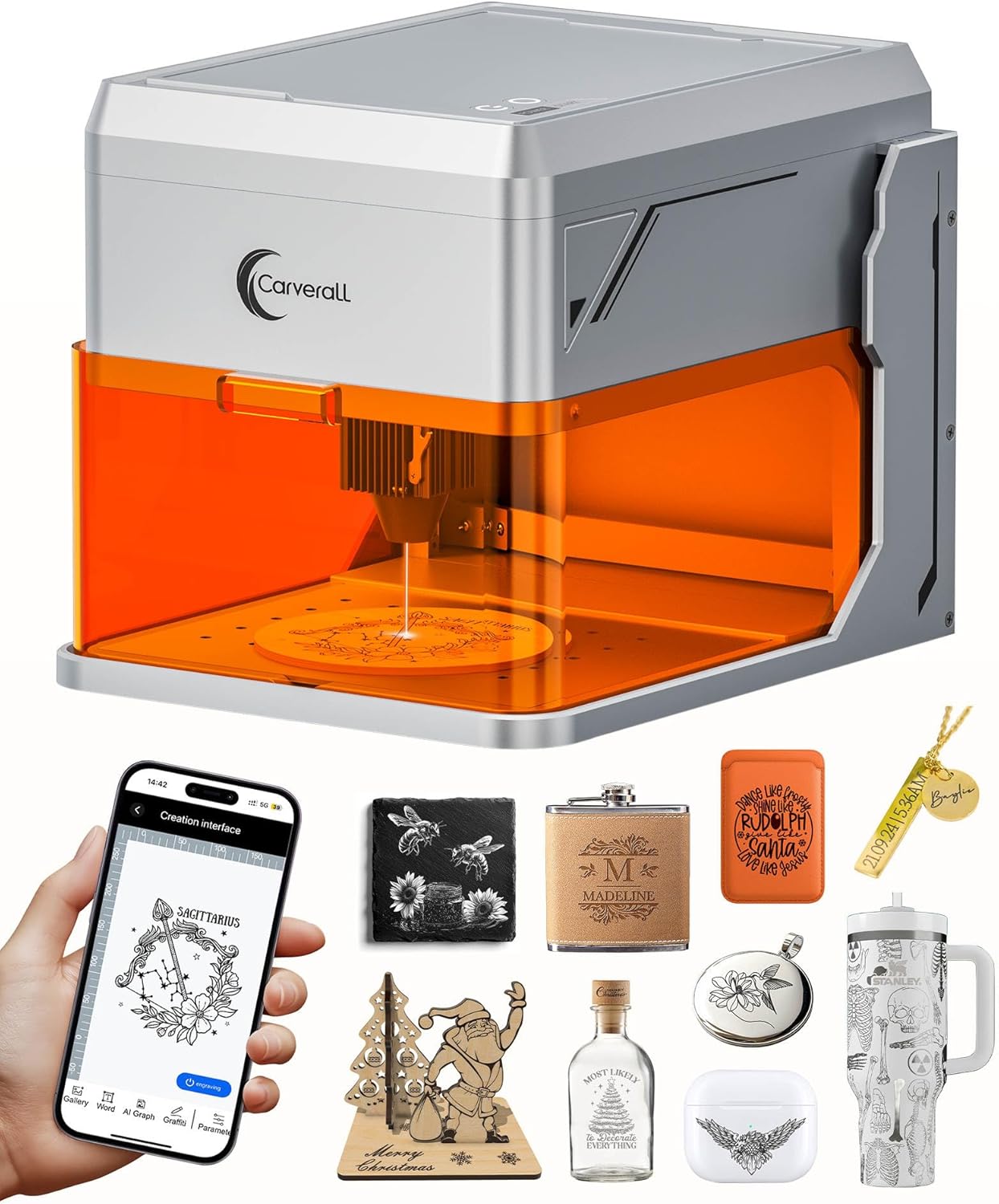
A 100 × 100 mm bed is the smallest here, but the £209.99 price, 68 ratings and camera make it a tidy starter.
Advantages
- Class 1 fully enclosed body with automatic cut-off on the lid
- HD camera with real-time preview and drag-and-drop alignment
- Listing states tested output of 5.12–5.35W
- 68 ratings at 4.4 and only 4.2 kg
- Wi-Fi, Type-C and offline engraving from a TF card
Disadvantages
- 100 × 100 mm bed, the smallest in this top ten
- 12,000 mm/min is 200 mm/s, mid-pack at best
- £209.99 despite the small bed
- 9% of its ratings are one star
Seventh at £209.99, with 68 ratings at 4.4 and a 4.2 kg body. It is a 5W Class 1 unit on a 100 × 100 mm bed with a quoted 12,000 mm/min, which is 200 mm/s — so it is neither the cheapest nor the fastest, and its bed is the smallest of the ten.
The safety design is the selling point. The listing describes this fully enclosed Class 1 laser engraving machine as cutting out when the cover opens, and adds 15° tilt protection, an HD camera for drag-and-drop alignment and pre-calibrated presets for sheets under 3 mm. It connects over Wi-Fi or Type-C and can engrave offline from a TF card, with an optional rotary roller for cylindrical work.
Worth noting on the power claim: the module is sold as 5,000 mW, and the listing says actual tested output reaches 5.12–5.35W, which is above its own nominal figure. The counterweight is the bed. The £161.49 LONGER Ray5 Mini 5.5W gives 130 × 130 mm for £48 less, and 9% of the Carverall's ratings are one star.
Creality 10W Laser Cutter and Engraver, 400 × 415 mm

The biggest bed in the cheap half at 400 × 415 mm for £269, but 16% of its 20 ratings are one or two stars.
Advantages
- 400 × 415 mm bed, the largest under £300
- Anti-UV acrylic cover claimed to block 97% of UV
- Aluminium alloy frame with steel shaft wheel guide rail
- Cuts 5 mm basswood or 3 mm black acrylic in one pass
- 12 months of parts replacement offered by the listing
Disadvantages
- 0.06 × 0.06 mm spot is coarser than the £135.99 Ray5 Mini's
- 10,000 mm/min is 167 mm/s, the slowest here
- 16% of its ratings are one or two stars
- Only 20 ratings in total to judge by
Eighth at £269 for a 10W diode unit with a 400 × 415 mm bed, the largest working area in the bottom half of this list. Quoted speed is 10,000 mm/min, which is 167 mm/s — the slowest figure of the ten once everything is converted.
The framing is aluminium alloy with a steel shaft wheel guide rail and a belt tension adjustment, and it will cut 5 mm basswood or 3 mm black acrylic in one pass. An anti-UV acrylic cover is claimed to block 97% of UV, the module has a tool-free focus plate, and assembly is quoted at 10–20 minutes. LightBurn is a paid extra; LaserGRBL is the free route.
By contrast with the price, the figures are modest. The spot is 0.06 × 0.06 mm and described as ultra-fine, yet the £135.99 Ray5 Mini quotes 0.04 × 0.04 mm for half the money. And 16% of its 20 ratings sit at one or two stars, the weakest histogram in this top ten.
LONGER Ray5 Mini 5.5W, 130 × 130 mm, Wi-Fi

£1.71 more than the second 3.5W Ray5 listing buys 2W extra, but the quoted spot grows from 0.04 mm to 0.08 mm.
Advantages
- 5.5W module for £1.71 more than the other Ray5 3.5W listing
- 12,000 mm/min with a 32-bit motherboard
- Emergency stop, flame sensor and eye protection included
- Wi-Fi with app monitoring and offline engraving
- 4.5 from 48 ratings in a 2.6 kg frame
Disadvantages
- Spot quoted at 0.08 mm, coarser than the 3.5W version's 0.04 × 0.04 mm
- 130 × 130 mm bed, smaller than the 3.5W listing's 130 × 140 mm
- 11% of its ratings are one or two stars
- £25.50 more than the 3.5W machine ranked below it
Ninth at £161.49, with 48 ratings at 4.5 and a 2.6 kg frame. Setting it against the other Ray5 listings is the whole point: Amazon carries the 3.5W Ray5 Mini at £159.78 elsewhere, so £1.71 extra buys 2W more power. Against the 3.5W machine ranked below it, the gap is £25.50.
The machine arrives pre-assembled, with a dovetail guide for height adjustment and a 32-bit motherboard driving 12,000 mm/min — 200 mm/s. Safety covers an emergency stop button, a flame sensor and eye protection, and there is Wi-Fi with app monitoring for offline jobs. LaserGRBL and LightBurn are both supported.
The catch sits in the small print of the two listings. This 5.5W model quotes a 0.08 mm spot; the 3.5W version quotes 0.04 × 0.04 mm. More power, coarser focus — the opposite of what the higher price implies. Its working area is also listed as the smaller 130 × 130 mm against the 3.5W model's 130 × 140 mm, and 11% of its ratings are one or two stars.
LONGER Ray5 Mini 3.5W, 140 × 130 mm, Wi-Fi

Cheapest here at £135.99 and by far the best-evidenced, with 410 ratings at 4.3 — but 12% of those are one or two stars.
Advantages
- £135.99, the lowest price in this top ten
- 410 ratings at 4.3, the largest review base by a wide margin
- 0.04 × 0.04 mm spot, the finest quoted among the diode machines
- Motion-detection shutdown, X/Y limit switches and goggles included
- 2.37 kg and delivered pre-assembled
Disadvantages
- 3.5W is the lowest output on this list
- 12% of its ratings are one or two stars
- 140 × 130 mm bed limits project size
- The same machine is listed elsewhere at £159.78
Last place, but the cheapest machine on the list at £135.99, and the only one with a serious review history: 410 ratings at 4.3, more than five times the next-largest sample. It is a 3.5W laser engraver over a 140 × 130 mm bed, with a 0.04 × 0.04 mm spot and 12,000 mm/min — the finest quoted spot of any diode machine here.
It ships pre-assembled and connects by USB, Wi-Fi or app, with LaserGRBL, LightBurn and LaserBurn all listed as compatible. Safety covers an emergency stop button, motion-detection auto-shutdown, X/Y limit switches and goggles. At 2.37 kg it is the lightest machine in this top ten.
Who should not buy it: anyone cutting thick stock. 3.5W is the lowest output here, and the 5.5W Ray5 Mini costs £25.50 more for 2W extra. Even so, the sharper caveat is the duplicate listing. The same Ray5 Mini 3.5W, the same 0.04 × 0.04 mm spot and the same 12,000 mm/min are also on sale at £159.78 with 40 ratings at 4.0 — £23.79 for nothing. Meanwhile 12% of this machine's 410 ratings are one or two stars.
All 10 compared
The same ranking side by side, now that the numbers have names.
1
2
3
5
6
7
8
9
10
| # | Product | Price | Amazon rating |
|---|---|---|---|
| 1 | xTool F2 Ultra UV Laser Engraving Machine (Pro Use) | £3,505.00 | 5.0 (7) |
| 2 | GWEIKE G2 Pro 30W Fibre Laser Marking Machine | £1,499.00 | 4.6 (11) |
| 3 | xTool F2 Dual-Source Engraver, 15W Diode + 5W IR | £1,549.00 | 4.5 (9) |
| 4 | Creality Falcon A1 10W Enclosed Laser Cutter and Engraver | £539.00 | 4.2 (73) |
| 5 | Woxcker L2 MAX 20W Laser Engraving Machine, 300 × 300 mm | £589.99 | 4.6 (33) |
| 6 | Woxcker L2 MAX 10W Laser Engraving Machine, 300 × 300 mm | £389.99 | 4.4 (45) |
| 7 | Carverall A1 Pro 5W Enclosed Laser Engraver with Camera | £209.99 | 4.4 (68) |
| 8 | Creality 10W Laser Cutter and Engraver, 400 × 415 mm | £269.00 | 4.4 (20) |
| 9 | LONGER Ray5 Mini 5.5W, 130 × 130 mm, Wi-Fi | £161.49 | 4.5 (48) |
| 10 | LONGER Ray5 Mini 3.5W, 140 × 130 mm, Wi-Fi | £135.99 | 4.3 (410) |
Final Verdict
For most homes, the £135.99 LONGER Ray5 Mini 3.5W is the sensible first laser engraver: 410 ratings, 4.3, and a 0.04 × 0.04 mm spot over a 140 × 130 mm bed. If you need to mark stainless steel or titanium, the 30W GWEIKE G2 Pro is the fibre laser engraver to look at. If you want a sealed cabinet for a shared room, the Woxcker 20W at £589.99 gives you a fully enclosed Class 1 body with a 12 mm wood cut claim, while the £539 Creality Falcon A1 adds a camera and a larger 387 × 305 mm bed for less money. Either way, check the two Ray5 3.5W listings before you buy. The £23.79 gap buys you nothing.
Why trust this ranking?
We rank on price, customer ratings and the specifications that decide the job, and we read each specification table against the marketing bullets on the same listing. When a number does not survive that check, we say so in the entry rather than quietly dropping the product. We also say when a product is the wrong one for you.
How we rank, in full
Written by
Felipe Iglesias
Founder & Lead Reviewer
Felipe is a computational engineering student who has been working in SEO since he was sixteen. He founded ranked10 and researches every guide on the site.
Related buying guides
Every guide below ranks ten products the same way this one does.
 Tech
Tech
Best Mini Projector 2026: 10 Ranked
The best mini projector here is the XuanPad 40000L at £129.99: native 1080p and Netflix built in. We rank 10 and compare the real ANSI lumens.
 Tech
Tech
Best Gaming Motherboard 2026: 10 Ranked
Best gaming motherboard 2026: the £127.99 ASUS TUF Gaming B650-Plus WiFi wins with 14 power stages at £9.14 each, half the £16.22 a stage of a dearer board.
 Tech
Tech
Best Floorstanding Speakers 2026: 10 Ranked
Best floorstanding speakers 2026: the Q Acoustics 3050i wins with two 165 mm drivers per tower, and the Fenton SHF700B pair costs £159.90.
 Tech
Tech
Best Binoculars 2026: 10 Ranked
The best binoculars for 2026 ranked: the £25.99 Kylietech 12x42 gives a 3.5 mm exit pupil, nearly three times the light of the £34.99 occer 12x25.
 Tech
Tech
Best Camcorder 2026: 10 Ranked
The best camcorder for most buyers is the FIREFOTO 4K 64MP at £59.99, working out at £0.94 a megapixel against £2.49 on the 8K PITIKI.
 Tech
Tech
Best OLED Gaming Monitor 2026: 10 Ranked, Brightness Listed Four Ways
The best OLED gaming monitor picks ranked by panel, refresh rate and price — brightness is listed four different ways across these listings.
 Tech
Tech
Best 128GB SD Cards 2026: 10 Ranked, and Three Adverts That Contradict Themselves
Every 128GB SD card here leads with read speed. Three listings contradict their own specs — we show you both numbers before you buy.
 Tech
Tech
Best DAB Radios 2026: 9 Ranked, and the 30W Claim That Doesn't Add Up
The best DAB radios compared: one claims 30W yet a 2,000mAh battery lasting 10 hours — that averages 0.74W. Nine models ranked on their own figures.
 Tech
Tech
Best CPU Air Cooler 2026: 10 Ranked, One Sold Twice at Two Prices
We ranked the best CPU air cooler picks on Amazon, including the same Peerless Assassin 120 SE listed twice at £29.99 and £35.90.
 Tech
Tech
Best Case Fans 2026: 9 Ranked by What a Fan Actually Costs
The best case fans are rarely sold singly: a £21.49 five-pack is £4.30 a fan, while £18.99 buys one. Nine ranked by cost per fan and quoted noise.
Products you might like
The best rated products from our other Tech guides.
-
Noctua NF-P12 redux-1700 PWM 120mm Quiet Fan
£12.95
4.8
in Best Case Fans 2026: 9 Ranked by What a Fan Actually Costs
-
 WD_BLACK SN850X 4TB NVMe SSD
£499.99
4.8
in Best 4TB SSD for PS5: 10 Ranked, and the Speed Numbers That Don't Add Up
WD_BLACK SN850X 4TB NVMe SSD
£499.99
4.8
in Best 4TB SSD for PS5: 10 Ranked, and the Speed Numbers That Don't Add Up
-
 Canon EF 50mm f/1.8 STM
£129.00
4.8
in Best 50mm Lens 2026: 10 Ranked, Spec Sheets Cross-Checked
Canon EF 50mm f/1.8 STM
£129.00
4.8
in Best 50mm Lens 2026: 10 Ranked, Spec Sheets Cross-Checked
-
Noctua NH-D15 Dual Tower CPU Cooler
£99.95
4.8
in Best CPU Air Cooler 2026: 10 Ranked, One Sold Twice at Two Prices
-
 Corsair MP600 PRO LPX 4TB PS5 SSD
£415.01
4.8
in Best 4TB SSD for PS5: 10 Ranked, and the Speed Numbers That Don't Add Up
Corsair MP600 PRO LPX 4TB PS5 SSD
£415.01
4.8
in Best 4TB SSD for PS5: 10 Ranked, and the Speed Numbers That Don't Add Up
-
 CTEK MXS 5.0 5A Battery Charger with Temperature Compensation
£74.49
4.8
in Best Car Battery Charger 2026: 10 Ranked, and Two Share a Model Number
CTEK MXS 5.0 5A Battery Charger with Temperature Compensation
£74.49
4.8
in Best Car Battery Charger 2026: 10 Ranked, and Two Share a Model Number
-
 JBL Charge 6 Portable Bluetooth Speaker, 24H, Built-in Powerbank
£159.00
4.8
in Best Bluetooth Speaker 2026: 10 Portable Speakers Ranked
JBL Charge 6 Portable Bluetooth Speaker, 24H, Built-in Powerbank
£159.00
4.8
in Best Bluetooth Speaker 2026: 10 Portable Speakers Ranked
-
 Acer Predator GM7 1TB NVMe Gen4
£155.99
4.8
in Best 1TB SSD for PS5: 10 Ranked, From £135.99 to £199.99
Acer Predator GM7 1TB NVMe Gen4
£155.99
4.8
in Best 1TB SSD for PS5: 10 Ranked, From £135.99 to £199.99
-
Acer Predator GM7 2TB SSD, Gen4 NVMe 2.0, 7200MB/s, Graphene Thermal Pad
£228.99
4.8
in Best 2TB SSD for PS5 in 2026: 10 Ranked Against Sony’s Own Rules
-
 Wharfedale Diamond 9.1 Bookshelf Speakers (Pair, Walnut)
£129.00
4.8
in Best Bookshelf Speakers 2026: 10 Ranked, From £94.99
Wharfedale Diamond 9.1 Bookshelf Speakers (Pair, Walnut)
£129.00
4.8
in Best Bookshelf Speakers 2026: 10 Ranked, From £94.99
-
 WD Elements 1TB Portable Hard Drive
£93.00
4.7
in Best 1TB External Hard Drive 2026: 10 Ranked, and the 625 MB/s Myth
WD Elements 1TB Portable Hard Drive
£93.00
4.7
in Best 1TB External Hard Drive 2026: 10 Ranked, and the 625 MB/s Myth
-
WD 2TB Elements Portable External Hard Drive
£99.99
4.7
in Best 2TB External Hard Drive: 8 Ranked, and the Speeds That Don't Add Up
-
 Crucial BX500 1TB 2.5" SATA SSD
£149.99
4.7
in Best 1TB SATA SSD: 10 Ranked, and Why £190 Buys 10MB/s
Crucial BX500 1TB 2.5" SATA SSD
£149.99
4.7
in Best 1TB SATA SSD: 10 Ranked, and Why £190 Buys 10MB/s
-
 soundcore Anker 2 Portable Bluetooth Speaker, 12W Stereo, IPX7, 24H
£28.49
4.7
in Best Bluetooth Speaker 2026: 10 Portable Speakers Ranked
soundcore Anker 2 Portable Bluetooth Speaker, 12W Stereo, IPX7, 24H
£28.49
4.7
in Best Bluetooth Speaker 2026: 10 Portable Speakers Ranked
-
 SanDisk 512GB Extreme microSD Card + Adapter
£109.00
4.7
in Best 512GB MicroSD Card 2026: 10 Ranked, and Why Read Speed Misleads
SanDisk 512GB Extreme microSD Card + Adapter
£109.00
4.7
in Best 512GB MicroSD Card 2026: 10 Ranked, and Why Read Speed Misleads
Comments
Reader comments are not checked against the manufacturer's claims above.
No comments yet
Be the first to add something we missed — a price change, a spec that turned out wrong, or how one of these held up.
Leave a comment
No account needed. Own one of these? Tell other readers how it actually performed.