Best NAS Enclosure 2026: 10 Ranked, and Why the TB Maths Doesn't Add Up
By Felipe Iglesias · Updated

No two listings here agree on how much a single bay holds. The UGREEN DXP4800 Plus advertises 144TB in its bullets and 112TB in its specification table — four bays either way, so 36TB a bay in one place and 28TB in the other. UGREEN's own numbers give 34TB a bay on its 8-bay model (272TB), 32TB on the 4-bay (128TB) and 40TB on a 2-bay (80TB). Synology quotes 36TB for two bays, or 18TB a bay. So when we rank the best nas enclosure options, we rank what you can actually see: bay count, network port (1GbE, 2.5GbE or 10GbE) and price. The TB in the title depends on a drive no listing identifies.
We ranked ten of the best nas enclosure boxes on Amazon on four checkable things — bays, port, price and review volume — then read every capacity claim against the rest of the same page. Prices at the time of writing run from £176.90 to £1,139, and the cheapest unit here is not the one with the smallest capacity claim. If you want the best nas enclosure for home use rather than for a rack, the two-bay models at the top of this list are where the value sits.
UGREEN NASync DXP2800 2-Bay NAS (Diskless)

Cheapest 2.5GbE unit here at £279.95, and its 80TB claim over two bays works out at 40TB a bay — tied with the priciest two-bay model.
Advantages
- £279.95 for a 2.5GbE port — the cheapest networked unit in this list.
- 80TB over two bays, or 40TB a bay, tied for the highest per-bay claim here.
- Intel N100 quad-core with 8GB DDR5 and two M.2 NVMe slots.
- 249 ratings at 4.5 stars, and first place in Amazon's NAS Enclosures category.
- Aluminium body at 4.25kg, with Docker and VM support.
Disadvantages
- Two SATA bays only, and no 10GbE port.
- The 80TB figure needs two 40TB drives; no listing names them.
- 9% of the rating breakdown is one or two stars.
- The 1GB-in-three-seconds claim gives no drive model or test setup.
First place is about price and ports, not capacity. The DXP2800 sits at number 1 in Amazon's NAS Enclosures category with 249 ratings at 4.5 stars, and it is the cheapest unit in this list with a 2.5GbE port. Its 80TB ceiling over two bays works out at 40TB a bay, which ties the £459.99 DXP2800 GT for the highest per-bay figure claimed anywhere here. That is the best nas enclosure arithmetic in the group — and it still assumes a 40TB drive the listing never names.
Inside there is an Intel N100 quad-core, 8GB DDR5, two 3.5in SATA bays and two M.2 NVMe slots for cache or fast storage. UGREEN quotes about three seconds for a 1GB transfer over 2.5GbE, plus Docker and virtual machine support in a 4.25kg aluminium body. For a home nas enclosure, that mix covers media streaming, file sync and photo backup without much fuss.
Skip it if you want 10GbE or more than two drive bays. There is no 10GbE port here, and the NVMe slots cannot take 3.5in drives. Worth noting: 9% of the rating breakdown sits at one or two stars, so the 4.5 average is not unanimous.
Synology DS224+ 2-Bay Desktop NAS

The most-reviewed box here at 882 ratings, yet the listing names no CPU, no port speed and no capacity figure.
Advantages
- 882 ratings at 4.5 stars — the largest review base in this list.
- The bullets make no TB claim, so there is no inflated capacity to unpick.
- Software covers file and photo management, backup tools and camera surveillance.
- Compact at 1.3kg and 16.5 x 24.5 x 23.32cm.
Disadvantages
- £532.00 for two bays — more than the four-bay DXP4800 Plus at £525.99.
- No CPU, RAM or port speed given anywhere in the listing data.
- About 7% of the rating breakdown is one or two stars.
- With no capacity figure, it cannot be compared on TB with anything else here.
Second place goes to the most-reviewed unit in the list: 882 ratings at 4.5 stars and 22nd in Amazon's NAS Enclosures category. It is also the one listing with nothing to catch out. The bullets talk about centralised storage, sharing, backup and camera surveillance, but there is no TB figure, no CPU model and no network port speed anywhere in the data. By contrast, every other entry here commits to a number you can at least check.
What the page does tell you is that it weighs 1.3kg, shipped in August 2023, and runs Synology's own toolset for file and photo management, data protection and camera monitoring. In practice that is a software story rather than a hardware one. Crucially, at £532.00 it costs more than the four-bay DXP4800 Plus at £525.99 — you are paying for the platform, not for bays.
Do not buy it on capacity maths, because there are none to do. If you want a cheaper route into a Synology home nas enclosure, the DS223J further down is £179.97. If you want four bays for the same money, this is not it.
UGREEN NASync DXP4800 Plus 4-Bay NAS, 10GbE

The contradiction in one listing: 144TB in the bullets and 112TB in the specs, four bays both times — 36TB a bay against 28TB.
Advantages
- 10GbE plus 10Gbps USB ports, quoted at under a second for 1GB.
- Four SATA bays and two M.2 NVMe slots in one chassis.
- 8GB DDR5 and RAID levels that allow recovery after a drive failure.
- 4.7 stars from 144 ratings — the second-highest score in this list.
- £525.99 for four bays is less than the two-bay Synology DS224+ at £532.00.
Disadvantages
- 144TB in the bullets and 112TB in the specs — a 32TB gap in one listing.
- 112TB over four bays means 28TB drives; the listing never says so.
- Only 144 ratings, and 3% of the breakdown is one star.
- No drive included, so the headline capacity is a theoretical maximum.
This is where the capacity maths breaks in front of you. The bullets promise up to 144TB; the specification field reads 112TB. Both figures sit on the same four bays and the same two M.2 NVMe slots, which is 36TB a bay in one line and 28TB in the other. In theory the difference is drive size. In practice nobody tells you which drive, so only the bay count is checkable. It ranks 4th among NAS Devices, at 4.7 stars from 144 ratings.
The hardware is the strongest argument for it: a 10GbE port and 10Gbps USB, quoted at under a second for a 1GB backup, 8GB DDR5, and RAID options that survive a drive failure. As a best nas enclosure for media libraries, that port is the part you will actually feel day to day. The AI photo album and duplicate removal are extras on top.
That said, do not buy it expecting a settled maximum. If 2.5GbE is enough, the four-bay DH4300 Plus costs £313.99 — £212 less. And at 28TB a bay in the spec table, the 112TB figure assumes drives that are not standard retail stock.
Synology DS223J 2-Bay Desktop NAS

The cheapest unit here at £179.97 and the lowest per-bay claim: 36TB over two bays is 18TB a bay, less than half UGREEN's two-bay figure.
Advantages
- £179.97 — the lowest price in this list.
- 1,234 ratings at 4.2 stars, the biggest sample of any unit here.
- Its 36TB claim appears identically in the bullet and the Storage Volume field.
- File self-healing, snapshots and cloning, plus multi-destination backup.
- 1.58kg with a metal enclosure.
Disadvantages
- 18TB a bay — the lowest per-bay figure claimed here.
- No network port speed stated in the listing at all.
- Joint-lowest average at 4.2 stars; 13% of the breakdown is one or two stars.
- The spec table lists Size as 0TB while Storage Volume reads 36TB.
Cheapest and most reviewed: £179.97, 1,234 ratings at 4.2 stars and 2nd in Amazon's NAS Devices category. The capacity claim is 36TB. Over two bays that is 18TB a bay, less than half the 40TB a bay claimed for the two-bay DXP2800. It is at least a consistent claim — the same 36TB appears in the bullet and in the Storage Volume field. The Size field, however, reads 0TB, which is the sort of thing to expect in spec tables.
Physically it is a 1.58kg metal box, 10cm deep, with file self-healing, snapshots and cloning in the software and backup to several destinations. For a 2 bay nas enclosure used as a first private cloud, that covers photos, documents and a media library, and it does camera surveillance too.
Do not buy it for throughput. No network port speed is stated anywhere in the listing, and the 4.2 star average is joint-lowest here. About 13% of the rating breakdown is one or two stars.
UGREEN DH2300 2-Bay NAS with 4K HDMI

A 2-bay unit with a 1GbE port and a savings claim that actually checks out — €59.99 a month is €719.88 a year.
Advantages
- £176.90 — second-cheapest here, and the cheapest with 4K HDMI output.
- The €719.88 annual saving is consistent with €59.99 a month.
- 1GbE port, 4GB RAM and NFC setup from a phone.
- 4K HDMI output for playing media straight to a TV.
- 60TB ceiling over two bays, or 30TB a bay.
Disadvantages
- 1GbE is the slowest network port in this list; no 2.5GbE or 10GbE.
- The only listing here that states assembly is required.
- The Size field reads 2U x 17.5 x 25.5in for a 1.52kg desktop unit.
- 8% of the rating breakdown is one or two stars.
Two things stand out. First, this is the one unit here whose running-cost claim survives arithmetic: the listing says you save €719.88 a year against a 12TB plan at €59.99 a month, and 59.99 times 12 is 719.88. Second, its port is 1GbE, the slowest connection in this list. At £176.90 with a 60TB ceiling, that is 30TB a bay.
The pitch is domestic rather than technical: an NFC tap to set up, apps for Windows, macOS, Android, iOS and smart TVs, a 4K HDMI output straight to a television, and an AI album that sorts by face and place. Meanwhile the hardware is a 1.52kg unit with 4GB RAM and no 2.5GbE. Whether that suits you depends on whether you stream from it or only back up to it.
Do not buy it if file transfer speed is the point. A 1GbE port is roughly a quarter of the throughput of 2.5GbE, and there is no 10GbE option on this model. It is also the only entry here whose spec sheet says assembly is required.
UGREEN NASync DH4300 Plus 4-Bay NAS

The cheapest 4 bay nas enclosure here at £313.99, and its 128TB over four bays matches UGREEN's own 32TB-a-bay figure elsewhere.
Advantages
- £313.99 for four bays — the cheapest 4 bay nas enclosure in this list.
- 128TB over four bays, or 32TB a bay, consistent between bullet and spec field.
- 2.5GbE port, 8-core A76+A55 processor and 8GB LPDDR4X.
- 1GB transferred in around three seconds, according to the listing.
- AI photo sorting, encryption, firewall and two-factor authentication.
Disadvantages
- Plastic enclosure at 2.59kg.
- 11% of the rating breakdown is one star, the highest share here.
- Only 96 ratings, at 4.2 stars — joint-lowest average.
- No 10GbE port, and drives are not included.
Four bays for £313.99 — £212 less than the DXP4800 Plus and £218 less than the two-bay Synology DS224+. The claim is 128TB, which over four bays is 32TB a bay and matches the figure used for a 4-bay model elsewhere in the range. For once the bullet and the Storage Volume field agree. It also carries the weakest review profile here, on 96 ratings: 4.2 stars, with 16% of the breakdown at one or two stars.
The hardware is a 2.5GbE port, an 8-core A76+A55 chip and 8GB LPDDR4X, quoted at about three seconds for 1GB. The enclosure is plastic at 2.59kg, and there are AI photo tools, encryption, a firewall and two-factor authentication. At the same time, this is the best home nas server candidate here if you want four bays without paying for 10GbE.
It is not the best nas enclosure for a 10GbE network, and it is not the one to buy if a metal chassis matters. The port tops out at 2.5GbE and the 1-star share — 11% of the breakdown — is the highest in this list. Note too that drives are not included.
Synology DS225+ 2-Bay NAS (Diskless)

No capacity claim at all, a 3-year warranty, and a spec table that calls a 1.2kg desktop unit Rack Mount.
Advantages
- Three-year manufacturer warranty — the longest in this list.
- Intel Celeron J4125 quad-core with 2GB DDR4, upgradeable to 6GB.
- No inflated TB claim to unpick; the listing sticks to compatibility warnings.
- 208 ratings at 4.3 stars.
- DSM covers centralised storage, backup and private cloud use.
Disadvantages
- £373.99 for two bays, when four-bay units here cost £313.99 and £525.99.
- 2GB of base memory is the smallest allowance in this list.
- Spec table lists Rack Mount and 45 x 36 x 30cm for a 1.2kg desktop unit.
- No port speed and no capacity figure given anywhere.
This one sits mid-table on 208 ratings at 4.3 stars, and it is carried by what it does not claim. There is no TB figure in the bullets, which is unusual for a diskless nas enclosure. Instead the page lists an Intel Celeron J4125 quad-core, 2GB DDR4 upgradeable to 6GB, and a three-year manufacturer warranty — the longest cover in this list, where the rest offer two years.
The first bullet is a warning rather than a feature: it requires compatible drives and points you at Synology's compatibility list. Which means the buyer does the homework. The software side is the usual DSM set — centralised file storage, backup and a private cloud for home or business. Meanwhile the spec table reads Rack Mount for a 1.2kg unit measuring 45 x 36 x 30cm, which is plainly the wrong shelf.
Skip it if you want a capacity number to compare, or if 2GB of base memory is too little. About 4% of the rating breakdown is one star, and at £373.99 it sits between the four-bay DH4300 Plus and the four-bay DXP4800 Plus — both of which give you double the bays for less or about the same.
TERRAMASTER F2-425 2-Bay NAS (Diskless)

The only listing here that names the drive behind its total: 60TB given as 2 x 30TB, or 30TB a bay.
Advantages
- The only listing here that names the per-bay figure: 2 x 30TB for 60TB.
- 2.5GbE port and an Intel x86 quad-core with 4GB RAM.
- Quoted at 19dB(A), the lowest noise figure in this list.
- Hardware 4K H.265 decoding with Plex, Emby and Jellyfin support.
- Tool-free push-lock drive trays.
Disadvantages
- Only 17 ratings — the smallest review base in this list.
- 22% of the rating breakdown sits at two or three stars.
- 4GB non-ECC memory and a plastic enclosure.
- No 10GbE option.
This is the one capacity claim in the list that shows its working. TerraMaster writes up to 60TB and then adds 2 x 30TB for each bay, so the 30TB-a-bay assumption is visible. By contrast, every other entry here hands you a total and leaves the division to you — which is why per-bay maths is the only test worth running on any best nas enclosure claim. It is £237.99 with 17 ratings at 4.3 stars, the thinnest evidence base in the top half of this list.
Elsewhere: a 2.5GbE port, an Intel x86 quad-core with 4GB non-ECC SODIMM, hardware 4K H.265 decoding for Plex, Emby and Jellyfin, and a quoted 19dB(A). The trays are tool-free with a push-lock design, and the listing says a drive goes in within 10 seconds. Even so, the low noise figure is the unusual selling point for a bedroom or a small office.
Do not buy it if you want a large sample of other buyers. Seventeen ratings is not much to go on, and 22% of the breakdown sits at two or three stars. There is also no mention of 10GbE, and the enclosure is plastic.
UGREEN NASync DXP2800 GT 2-Bay NAS, 10GbE
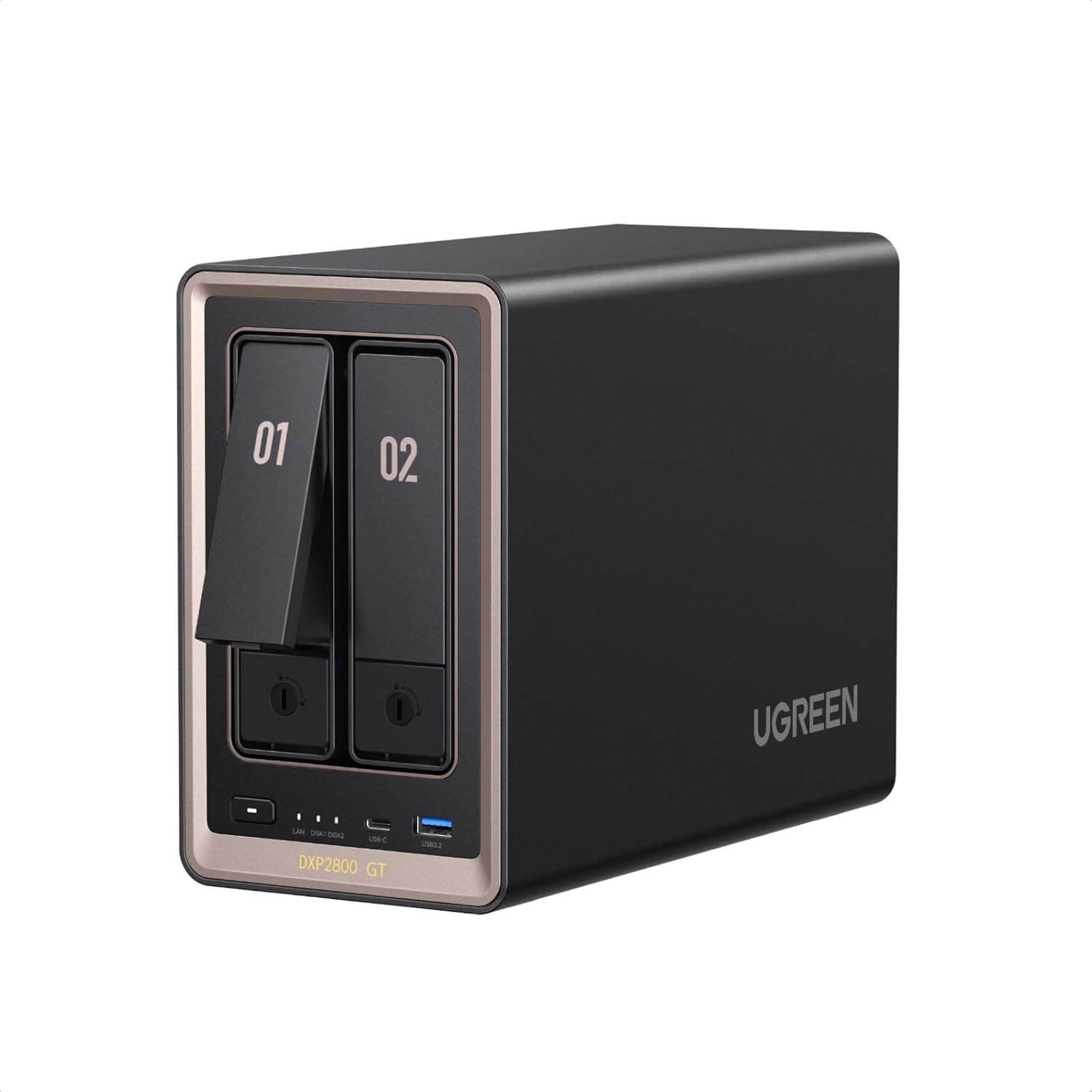
10GbE in a two-bay box, and a 1250 figure that appears as MB/s in one spec field and Mb/s in another — a factor of eight.
Advantages
- 10GbE LAN in a two-bay chassis, at £459.99.
- 80TB over two bays, or 40TB a bay — matched only by the £279.95 DXP2800.
- AMD Ryzen Embedded R2514 with 8GB DDR4 and dual M.2 NVMe slots.
- Two SATA bays that double as U.2 NVMe ready bays.
- Docker for Home Assistant and a Surveillance Center for IP cameras.
Disadvantages
- 1250MB/s in the bullet against 1250 megabits per second in the Data Transfer Rate field.
- Only 29 ratings, with 7% of the breakdown at one star.
- Two 3.5in bays only.
- Form Factor listed as ATX, which does not describe a desktop NAS.
Two bays, £459.99 and a 10GbE port. The capacity is 80TB, so 40TB a bay, level with the cheapest unit at the top of this list. The catch is the speed. The bullet says up to 1250MB/s. The Read Speed field says 1250 megabytes per second. The Data Transfer Rate field says 1250 megabits per second. Same number, two units, eight times apart — and the smaller reading is roughly 156MB/s.
Underneath sits an AMD Ryzen Embedded R2514 with 8GB DDR4, two SATA bays that double as U.2 NVMe ready bays, and two M.2 NVMe slots. This is the best nas enclosure with 10gbe if two bays are enough: 1250MB/s is about four times a 2.5GbE link. The listing also mentions Docker for Home Assistant and a Surveillance Center for IP cameras.
Do not buy it if you need more than two 3.5in bays, and do not take the transfer figure at face value. Only 29 ratings back the 4.6 star average, and 7% of the breakdown is one star. In short, the Form Factor field says ATX, which will not help you picture a desktop unit.
UGREEN NASync DXP8800 Plus 8-Bay NAS

Eight bays, dual 10GbE and 272TB — the same 34TB a bay figure UGREEN applies to its own 8-bay model.
Advantages
- Eight SATA bays and two M.2 NVMe slots, with a 272TB ceiling.
- Two 10GbE ports that aggregate to 20G, quoted at up to 2500MB/s.
- 12th Gen 10-core Intel Core i5 with 8GB DDR5.
- 4.8 stars — the highest average in this list.
- 8K HDMI and two Thunderbolt 4 ports listed in the item highlight.
Disadvantages
- Only 14 ratings, the smallest sample in this list.
- £1,139.00, the most expensive unit here by a wide margin.
- 34TB a bay assumes drives that no listing identifies.
- Spec table says Rack Mount and Wall Mount for a 9.3kg desktop unit.
The top of the range: £1,139.00, eight SATA bays, two M.2 NVMe slots and a 272TB ceiling. Divide 272 by eight and you get 34TB a bay, the figure used for this model throughout. It is the most consistent capacity claim in the list, and it still depends on a 34TB drive that no listing names. Review evidence is the thinnest here: 14 ratings at 4.8 stars.
The networking is the reason to look at it. Two 10GbE ports can be aggregated into 20G, which is quoted at up to 2500MB/s, and the processor is a 12th Gen 10-core Intel Core i5 with 8GB DDR5. The item highlight also lists 8K HDMI and two Thunderbolt 4 ports. As a best nas enclosure for a small studio, that is a different class of machine from everything above it.
Do not buy it on reviews alone, and do not buy it if two bays will do. Fourteen ratings is not much of a sample, even at 4.8 stars. As a result, the score is the least tested number on this page. The spec table also lists Rack Mount and Wall Mount for a 9.3kg unit that is shown as a desktop box.
All 10 compared
The same ranking side by side, now that the numbers have names.
1
2
3
4
5
6
7
8
9
10
| # | Product | Price | Amazon rating |
|---|---|---|---|
| 1 | UGREEN NASync DXP2800 2-Bay NAS (Diskless) | £279.95 | 4.5 (249) |
| 2 | Synology DS224+ 2-Bay Desktop NAS | £532.00 | 4.5 (882) |
| 3 | UGREEN NASync DXP4800 Plus 4-Bay NAS, 10GbE | £525.99 | 4.7 (144) |
| 4 | Synology DS223J 2-Bay Desktop NAS | £179.97 | 4.2 (1,234) |
| 5 | UGREEN DH2300 2-Bay NAS with 4K HDMI | £176.90 | 4.5 (138) |
| 6 | UGREEN NASync DH4300 Plus 4-Bay NAS | £313.99 | 4.2 (96) |
| 7 | Synology DS225+ 2-Bay NAS (Diskless) | £373.99 | 4.3 (208) |
| 8 | TERRAMASTER F2-425 2-Bay NAS (Diskless) | £237.99 | 4.3 (17) |
| 9 | UGREEN NASync DXP2800 GT 2-Bay NAS, 10GbE | £459.99 | 4.6 (29) |
| 10 | UGREEN NASync DXP8800 Plus 8-Bay NAS | £1,139.00 | 4.8 (14) |
Final Verdict
For most homes, the two-bay UGREEN DXP2800 at £279.95 is the pick: 2.5GbE, an Intel N100, 249 ratings at 4.5 stars, and an 80TB ceiling that works out at 40TB a bay. If speed matters more than capacity, look at the 10GbE pair — the DXP2800 GT at £459.99 and the DXP4800 Plus at £525.99 — which are the best nas enclosure options for large-file work, though neither tells you which drive produces its headline TB. Synology buyers should note that the DS224+ and DS225+ quote no capacity figure at all, which is honest but hard to compare; the DS223J at £179.97 is the cheapest way in if you accept an 18TB-a-bay claim. Either way, budget for drives: every unit here is diskless, so the best nas enclosure price is only part of the total.
Why trust this ranking?
We rank on price, customer ratings and the specifications that decide the job, and we read each specification table against the marketing bullets on the same listing. When a number does not survive that check, we say so in the entry rather than quietly dropping the product. We also say when a product is the wrong one for you.
How we rank, in full
Written by
Felipe Iglesias
Founder & Lead Reviewer
Felipe is a computational engineering student who has been working in SEO since he was sixteen. He founded ranked10 and researches every guide on the site.
Related buying guides
Every guide below ranks ten products the same way this one does.
 Tech
Tech
Best Mini Projector 2026: 10 Ranked
The best mini projector here is the XuanPad 40000L at £129.99: native 1080p and Netflix built in. We rank 10 and compare the real ANSI lumens.
 Tech
Tech
Best Gaming Motherboard 2026: 10 Ranked
Best gaming motherboard 2026: the £127.99 ASUS TUF Gaming B650-Plus WiFi wins with 14 power stages at £9.14 each, half the £16.22 a stage of a dearer board.
 Tech
Tech
Best Floorstanding Speakers 2026: 10 Ranked
Best floorstanding speakers 2026: the Q Acoustics 3050i wins with two 165 mm drivers per tower, and the Fenton SHF700B pair costs £159.90.
 Tech
Tech
Best Binoculars 2026: 10 Ranked
The best binoculars for 2026 ranked: the £25.99 Kylietech 12x42 gives a 3.5 mm exit pupil, nearly three times the light of the £34.99 occer 12x25.
 Tech
Tech
Best Camcorder 2026: 10 Ranked
The best camcorder for most buyers is the FIREFOTO 4K 64MP at £59.99, working out at £0.94 a megapixel against £2.49 on the 8K PITIKI.
 Tech
Tech
Best OLED Gaming Monitor 2026: 10 Ranked, Brightness Listed Four Ways
The best OLED gaming monitor picks ranked by panel, refresh rate and price — brightness is listed four different ways across these listings.
 Tech
Tech
Best 128GB SD Cards 2026: 10 Ranked, and Three Adverts That Contradict Themselves
Every 128GB SD card here leads with read speed. Three listings contradict their own specs — we show you both numbers before you buy.
 Tech
Tech
Best DAB Radios 2026: 9 Ranked, and the 30W Claim That Doesn't Add Up
The best DAB radios compared: one claims 30W yet a 2,000mAh battery lasting 10 hours — that averages 0.74W. Nine models ranked on their own figures.
 Tech
Tech
Best CPU Air Cooler 2026: 10 Ranked, One Sold Twice at Two Prices
We ranked the best CPU air cooler picks on Amazon, including the same Peerless Assassin 120 SE listed twice at £29.99 and £35.90.
 Tech
Tech
Best Case Fans 2026: 9 Ranked by What a Fan Actually Costs
The best case fans are rarely sold singly: a £21.49 five-pack is £4.30 a fan, while £18.99 buys one. Nine ranked by cost per fan and quoted noise.
Products you might like
The best rated products from our other Tech guides.
-
Noctua NF-P12 redux-1700 PWM 120mm Quiet Fan
£12.95
4.8
in Best Case Fans 2026: 9 Ranked by What a Fan Actually Costs
-
 WD_BLACK SN850X 4TB NVMe SSD
£499.99
4.8
in Best 4TB SSD for PS5: 10 Ranked, and the Speed Numbers That Don't Add Up
WD_BLACK SN850X 4TB NVMe SSD
£499.99
4.8
in Best 4TB SSD for PS5: 10 Ranked, and the Speed Numbers That Don't Add Up
-
 Canon EF 50mm f/1.8 STM
£129.00
4.8
in Best 50mm Lens 2026: 10 Ranked, Spec Sheets Cross-Checked
Canon EF 50mm f/1.8 STM
£129.00
4.8
in Best 50mm Lens 2026: 10 Ranked, Spec Sheets Cross-Checked
-
Noctua NH-D15 Dual Tower CPU Cooler
£99.95
4.8
in Best CPU Air Cooler 2026: 10 Ranked, One Sold Twice at Two Prices
-
 Corsair MP600 PRO LPX 4TB PS5 SSD
£415.01
4.8
in Best 4TB SSD for PS5: 10 Ranked, and the Speed Numbers That Don't Add Up
Corsair MP600 PRO LPX 4TB PS5 SSD
£415.01
4.8
in Best 4TB SSD for PS5: 10 Ranked, and the Speed Numbers That Don't Add Up
-
 CTEK MXS 5.0 5A Battery Charger with Temperature Compensation
£74.49
4.8
in Best Car Battery Charger 2026: 10 Ranked, and Two Share a Model Number
CTEK MXS 5.0 5A Battery Charger with Temperature Compensation
£74.49
4.8
in Best Car Battery Charger 2026: 10 Ranked, and Two Share a Model Number
-
 JBL Charge 6 Portable Bluetooth Speaker, 24H, Built-in Powerbank
£159.00
4.8
in Best Bluetooth Speaker 2026: 10 Portable Speakers Ranked
JBL Charge 6 Portable Bluetooth Speaker, 24H, Built-in Powerbank
£159.00
4.8
in Best Bluetooth Speaker 2026: 10 Portable Speakers Ranked
-
 Acer Predator GM7 1TB NVMe Gen4
£155.99
4.8
in Best 1TB SSD for PS5: 10 Ranked, From £135.99 to £199.99
Acer Predator GM7 1TB NVMe Gen4
£155.99
4.8
in Best 1TB SSD for PS5: 10 Ranked, From £135.99 to £199.99
-
Acer Predator GM7 2TB SSD, Gen4 NVMe 2.0, 7200MB/s, Graphene Thermal Pad
£228.99
4.8
in Best 2TB SSD for PS5 in 2026: 10 Ranked Against Sony’s Own Rules
-
 Wharfedale Diamond 9.1 Bookshelf Speakers (Pair, Walnut)
£129.00
4.8
in Best Bookshelf Speakers 2026: 10 Ranked, From £94.99
Wharfedale Diamond 9.1 Bookshelf Speakers (Pair, Walnut)
£129.00
4.8
in Best Bookshelf Speakers 2026: 10 Ranked, From £94.99
-
 WD Elements 1TB Portable Hard Drive
£93.00
4.7
in Best 1TB External Hard Drive 2026: 10 Ranked, and the 625 MB/s Myth
WD Elements 1TB Portable Hard Drive
£93.00
4.7
in Best 1TB External Hard Drive 2026: 10 Ranked, and the 625 MB/s Myth
-
WD 2TB Elements Portable External Hard Drive
£99.99
4.7
in Best 2TB External Hard Drive: 8 Ranked, and the Speeds That Don't Add Up
-
 Crucial BX500 1TB 2.5" SATA SSD
£149.99
4.7
in Best 1TB SATA SSD: 10 Ranked, and Why £190 Buys 10MB/s
Crucial BX500 1TB 2.5" SATA SSD
£149.99
4.7
in Best 1TB SATA SSD: 10 Ranked, and Why £190 Buys 10MB/s
-
 soundcore Anker 2 Portable Bluetooth Speaker, 12W Stereo, IPX7, 24H
£28.49
4.7
in Best Bluetooth Speaker 2026: 10 Portable Speakers Ranked
soundcore Anker 2 Portable Bluetooth Speaker, 12W Stereo, IPX7, 24H
£28.49
4.7
in Best Bluetooth Speaker 2026: 10 Portable Speakers Ranked
-
 SanDisk 512GB Extreme microSD Card + Adapter
£109.00
4.7
in Best 512GB MicroSD Card 2026: 10 Ranked, and Why Read Speed Misleads
SanDisk 512GB Extreme microSD Card + Adapter
£109.00
4.7
in Best 512GB MicroSD Card 2026: 10 Ranked, and Why Read Speed Misleads
Comments
Reader comments are not checked against the manufacturer's claims above.
No comments yet
Be the first to add something we missed — a price change, a spec that turned out wrong, or how one of these held up.
Leave a comment
No account needed. Own one of these? Tell other readers how it actually performed.