Best Wifi 7 Router 2026: 10 Ranked, and the Numbers Behind the Badges
By Felipe Iglesias · Updated

On a best wifi 7 router, the headline number on the box is normally every band added together, not the speed any single device will see. The TP-Link Archer BE700 is sold as BE15000 with 15 Gbps, yet its own listing states a maximum upstream rate of 7,500 Mbps from a 10,000 Mbps LAN port. The Cudy WR11000 claims 1,500 m² of coverage — roughly 16,000 sq ft — while the other nine routers here claim 2,000 to 2,500 sq ft. Meanwhile, the Mercusys MR47BE is named BE9300 but lists a maximum upstream rate of 3,000 Mbps. At the same time, the two biggest numbers on this page — 15 Gbps and 12.5 Gbps — are a band sum and a port sum respectively.
We ranked ten of the best wifi 7 routers sold on Amazon, using four checks we could make in the listings themselves: how far the headline speed sits above the highest figure in the spec table, how many 2.5G ports the box really carries, the rating with a review count behind it, and the price against usable ports. Where a best wifi 7 router's own spec sheet contradicts its headline, we name both numbers.
Mercusys MR47BE BE9300 Tri-Band Wifi 7 Router
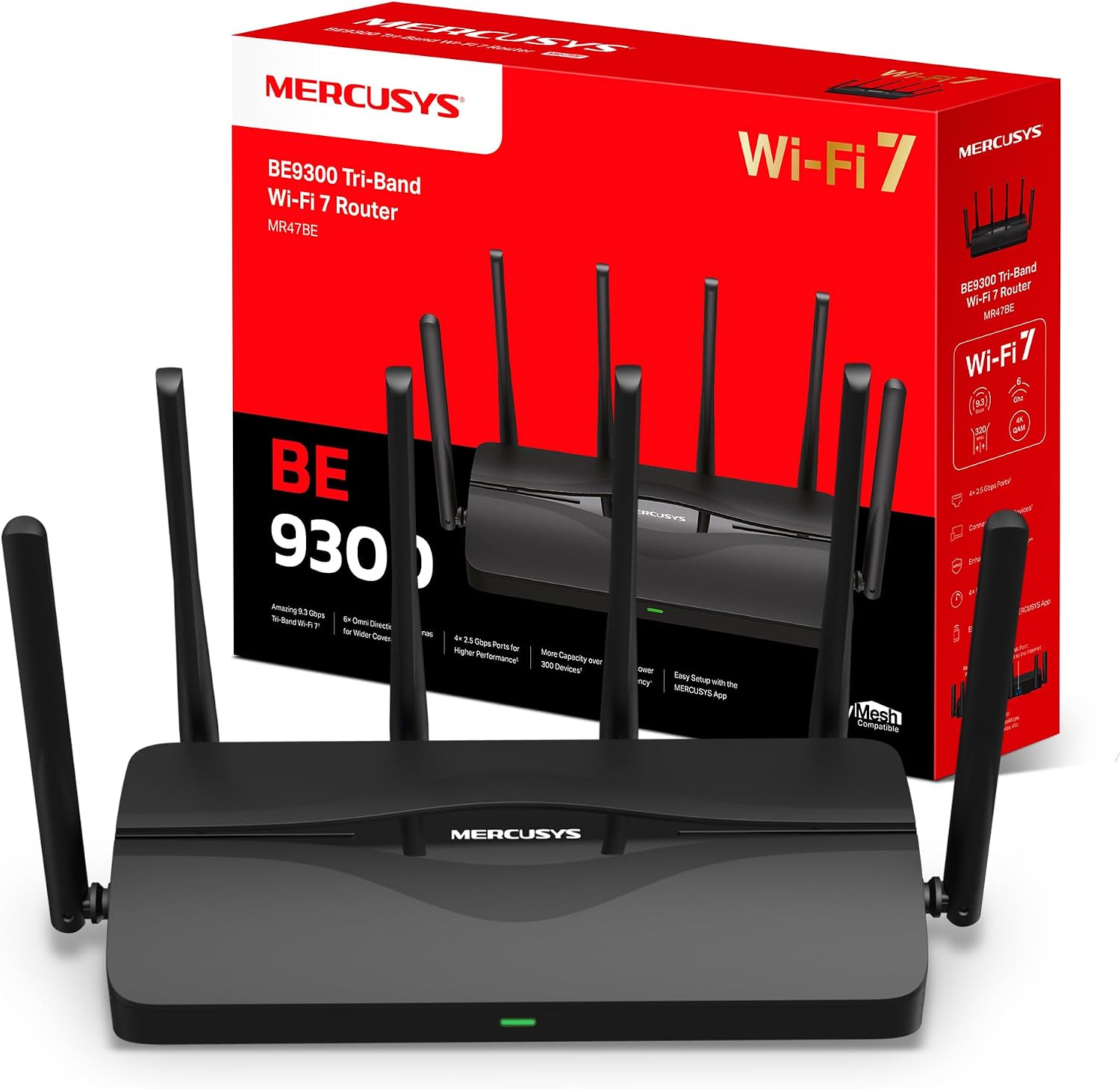
First because £149.52 buys four 2.5G ports, a 6 GHz band and 10,093 ratings — the best wifi 7 router value in the list, with its 3,000 Mbps upstream cap stated openly.
Advantages
- Four 2.5G ports (one WAN, three LAN) at £149.52
- 6 GHz band with 320 MHz channels, 4K-QAM and MLO
- 10,093 ratings at 4.3 stars — the largest buyer sample in this list
- Maximum upstream rate of 3,000 Mbps is stated openly in the spec table
- EasyMesh compatible, so extra nodes can be added later
Disadvantages
- The 9.3 Gbps headline is a tri-band sum, not a per-device speed
- No 10G port, so wired transfers cap at 2.5 Gbps
- 7% of its ratings are one star and 5% are two star
- Not modem compatible, so a separate modem or ONT is required
The MR47BE takes first place on the numbers a buyer can actually use: four 2.5G ports (one WAN, three LAN), a 6 GHz band with 320 MHz channels, and 10,093 ratings at 4.3 stars for £149.52. Its 9.3 Gbps badge is the tri-band sum, and the spec table is unusually straight about the ceiling — a 3,000 Mbps maximum upstream rate and 2,500 Mbps LAN bandwidth. It is the best wifi 7 router here on the balance of rating volume and wired capacity.
In practice, MLO and 4K-QAM do the work that the 9.3 figure implies. MLO lets a compatible device pull from more than one band at once, which cuts the latency spikes you notice in games and calls; 4K-QAM raises throughput per stream rather than per box. A tri-band wifi 7 router also gives you clean 6 GHz spectrum, which keeps older 2.4 GHz smart plugs off the fast lane.
However, this is not a 10G router. Every wired device stops at 2.5 Gbps, and the 3,000 Mbps upstream figure means no single client will see anything close to 9.3 Gbps. If you already run 10Gbe storage or a multi-gig fibre line, the Archer BE700 is the one to look at instead.
TP-Link Archer BE700 BE15000 Tri-Band Wifi 7 Router

Second only because it is the one box here with a 10,000 Mbps LAN port — while its own spec table caps upstream at 7,500 Mbps, half its 15 Gbps badge.
Advantages
- 10,000 Mbps LAN port — the only one in this list above 2.5 Gbps
- 15 Gbps is stated as the tri-band, 8-stream total
- 8,101 ratings at 4.3 stars
- USB 3.0 port plus built-in VPN client support
- EasyMesh compatible, with HomeShield security tools
Disadvantages
- Maximum upstream rate is 7,500 Mbps, half the 15 Gbps headline
- £299.99 — roughly double the cheapest router here
- 8% of its ratings are one star
- On a 1 Gbps line the 10G port does nothing at all
At £299.99 this is the most expensive router in the list, and it earns second place on a single genuine figure: a 10,000 Mbps LAN port. Nothing else here goes past 2.5 Gbps on wire. The 15 Gbps badge is the tri-band sum across 6 GHz, 5 GHz and 2.4 GHz, and TP-Link's own listing then states a maximum upstream data transfer rate of 7,500 Mbps — half the headline, printed in the same table.
In practice, the case for it is that wired port plus eight simultaneous streams across three bands. For a wifi 7 router for home use with a 10Gbe NAS, a media server or a multi-gig fibre connection, that 10G port is the difference between a bottleneck and none. There is a USB 3.0 port for shared storage, VPN client support, and HomeShield for network security and parental controls.
That said, most UK fibre lines sit at or below 1 Gbps, and no device on a 2.5G port will ever ask for 10,000 Mbps. If your LAN is all 1G and 2.5G hardware, the Mercusys above does the visible job for £149.52. Buy this one when you already own 10G equipment, not to future-proof a plan you may never order.
TP-Link Archer BE550 BE9300 with 5x 2.5G Ports

Third on port count: five 2.5G ports for £159.99, and the only listing here whose 9,214 Mbps upstream figure matches its 9,214 Mbps headline exactly.
Advantages
- Five 2.5G ports (one WAN, four LAN) for £159.99
- Spec table lists 9,214 Mbps for headline and maximum upstream — no gap at all
- 6 GHz band with 320 MHz channels and MLO
- Coverage stated at 2,000 sq ft with six internal antennas
- EasyMesh compatible for adding satellite nodes
Disadvantages
- 4.0 stars from 735 ratings — the lowest rating in the top five
- 13% of its ratings are one star
- Antennas are internal and fixed, so placement is the only tuning tool
- The 9,214 Mbps figure is still a tri-band sum
Third place goes to the port count. The BE550 carries five 2.5G ports — one WAN and four LAN — for £159.99, and its spec table repeats the same number twice: 9,214 Mbps data transfer rate and 9,214 Mbps maximum upstream, which means the headline and the ceiling are the same figure. It is the straightest sheet in this list, and on ports per pound it is the best wifi 7 router here under £200.
For a wifi 7 router with 2.5G ports, four LAN ports is the part that matters: a gaming PC, a NAS, a mesh node and a TV all at 2.5 Gbps without adding a switch. The 6 GHz band and MLO cover the wireless side, and coverage is listed at 2,000 sq ft. Six internal antennas are fixed, so where you put the box decides how well it performs.
Even so, 4.0 stars from 735 ratings is the weakest rating in the top five, and 13% of its ratings are one star. As always, 9.2 Gbps is a band sum. If you would rather buy on rating volume, the Mercusys has 10,093 ratings and the Archer BE400 has 11,449, both at similar money.
TP-Link Archer BE400 BE6500 Dual-Band Wifi 7 Router
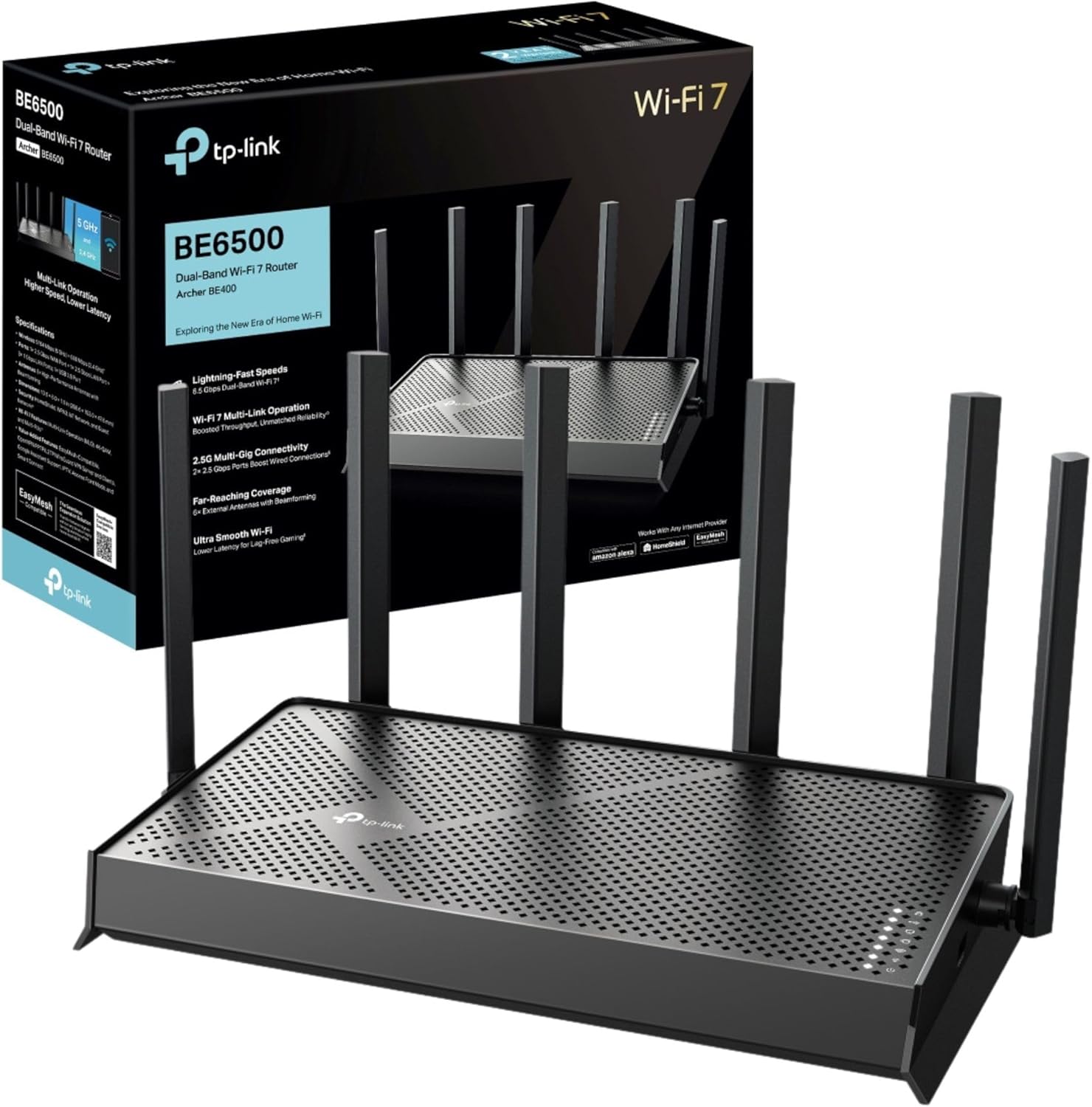
Fourth on buyer volume — 11,449 ratings at 4.3 stars — but its own compatibility row lists 802.11a/b/g/n/ac/ax and no 802.11be at all.
Advantages
- 11,449 ratings at 4.3 stars — the biggest buyer sample in the list
- £159.99 with a 2.5G WAN and a 2.5G LAN port
- EasyMesh compatible for whole-home mesh expansion
- Six external antennas with beamforming
- HomeShield security and parental controls included
Disadvantages
- Compatibility row omits 802.11be, the standard wifi 7 is built on
- Dual-band only — no 6 GHz band
- Three LAN ports are limited to 1 Gbps
- Maximum upstream rate is 2,500 Mbps, well under half the 6.5 Gbps badge
Fourth, on evidence. 11,449 ratings at 4.3 stars is the largest sample in this list, and at £159.99 that is a real signal. The 6.5 Gbps badge is a dual-band total, and the spec table states a 2,500 Mbps maximum upstream rate, so the 2.5G WAN port is the ceiling for any single device.
In practice you get one 2.5G WAN port, one 2.5G LAN port and three 1 Gbps LAN ports. That makes it a reasonable wifi 7 mesh router base: add EasyMesh extenders and the network roams between nodes without dropping. Six external antennas, app setup through Tether, and parental controls via HomeShield.
Crucially, though, the wireless compatibility row on this listing reads 802.11a, 802.11ac, 802.11ax, 802.11b and 802.11g. The 802.11be standard is absent from the very row that should list it. There is also no 6 GHz band, because the design is dual-band. Buy it for the price and the review history, not for a spec sheet that holds together line by line.
TP-Link Archer GE400 BE6500 Wifi 7 Gaming Router
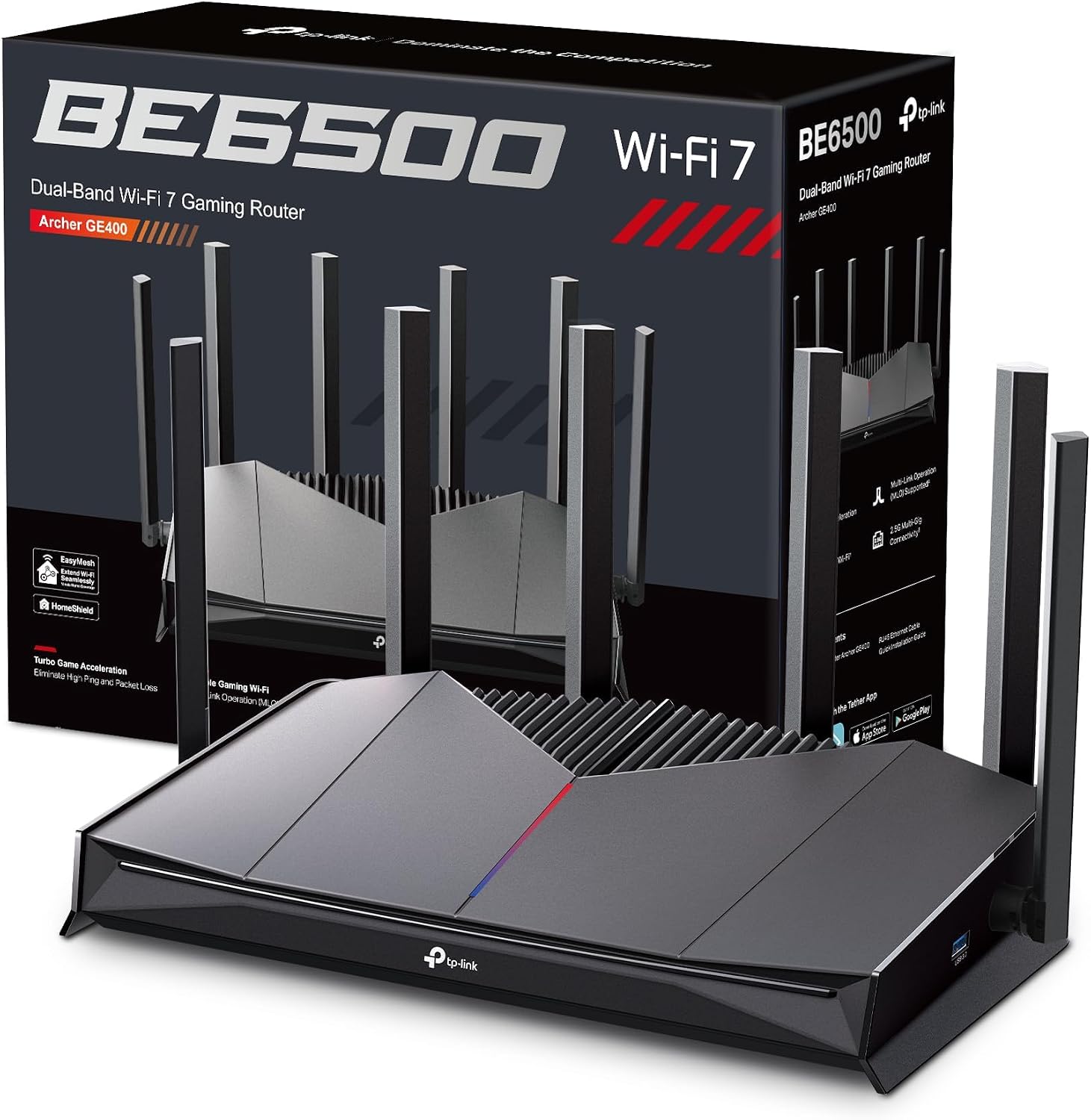
Fifth and the highest-rated router here at 4.4 stars, but its title says Full Gigabit Ports while its own bullet says two 2.5G ports.
Advantages
- 4.4 stars from 3,736 ratings — the highest rating in this list
- 5,765 Mbps on 5 GHz and 688 Mbps on 2.4 GHz with MLO and 4K-QAM
- Dedicated game panel with real-time network and device data
- Turbo game acceleration for applications, devices and servers
- Six antennas with beamforming
Disadvantages
- Title says Full Gigabit Ports; the bullets and spec table say 2.5G
- Two ports in total, per the spec table
- Dual-band only, with no 6 GHz band
- £199.99 is the highest price for a dual-band router here
Fifth, and the highest-rated box in this list: 4.4 stars from 3,736 ratings. The GE400 is a wifi 7 gaming router, with 5,765 Mbps on 5 GHz and 688 Mbps on 2.4 GHz, MLO and 4K-QAM, plus a dedicated game panel showing network status, accelerated games and RGB settings in real time.
The wired side is where the listing argues with itself. Crucially, the product title says Full Gigabit Ports. The second bullet says Two 2.5G Ports to Empower Your Games, and the spec table lists 2,500 Mbps LAN bandwidth with two ports in total. Either those ports are 2.5G and the title is wrong, or the title is right and the bullet is. At £199.99, worth asking before you order.
That said, this is dual-band — no 6 GHz — so a busy household gets no clean spectrum. The price buys game acceleration software and a race-car design, not bandwidth. If coverage matters more than RGB, the tri-band Mercusys costs £50 less and carries 10,093 ratings behind it.
Cudy WR11000 BE11000 Tri-Band Mesh Wifi 7 Router

The cheapest router here at £124.85 with four 2.5G ports — and a coverage claim of 1,500 m², about 16,000 sq ft, against 2,000 to 2,500 sq ft elsewhere.
Advantages
- £124.85, the lowest price in this list
- Four 2.5G ports, each running at 2.5 Gbps independently
- 1.5 GHz quad-core CPU and 512 MB DDR4, per the listing
- WireGuard, OpenVPN, IPsec, ZeroTier, PPTP and L2TP server and client
- Stated support for 200 simultaneous device connections
Disadvantages
- 1,500 m² coverage claim sits far outside the 2,000–2,500 sq ft the others claim
- The 11 Gbps badge is a tri-band sum
- A 10,000 Mbps maximum upstream rate cannot come from a 2.5G port
- 21% of its 234 ratings are one or two stars
Sixth on price, not on proof. At £124.85 the WR11000 is the cheapest router here, and it still lists four 2.5G ports, a 1.5 GHz quad-core processor and 512 MB of DDR4. Its 11 Gbps badge is the tri-band sum; the spec table states a 10,000 Mbps maximum upstream rate, a figure that no 2.5 Gbps port can carry on its own. On ports per pound it makes a case for best wifi 7 router under £130.
By contrast, the coverage claim is the one to examine. Cudy says the six-antenna array covers 1,500 m² — roughly 16,000 sq ft. Every other router in this guide claims 2,000 to 2,500 sq ft. As a result, that figure is not comparing like with like. Where the value is real is the VPN stack: WireGuard, OpenVPN, IPsec, ZeroTier, PPTP and L2TP, plus a stated 200 simultaneous connections, on a wifi 7 mesh router base that Cudy Mesh can extend.
However, 4.0 stars from 234 ratings is a small base, and 21% of those ratings sit at one or two stars. If coverage is your main worry, a tri-band unit rated at 2,500 sq ft plus one mesh node will behave more predictably than a 16,000 sq ft claim from a single box.
ASUS TUF Gaming BE9400 Tri-Band Wifi 7 Router

Seventh: 9,400 Mbps and 2,500 sq ft for £147.96, but the listing runs to one bullet and its spec table reads 5,764 Mbps against the 9,400 headline.
Advantages
- £147.96 with four 2.5G ports
- Tri-band 320 MHz with MLO and 4K-QAM
- Dedicated gaming port and OpenNAT for console forwarding
- AiMesh support for adding nodes later
- Coverage listed at 2,500 sq ft
Disadvantages
- Spec table reads 5,764 Mbps against a 9,400 Mbps headline
- Only one bullet point in the entire listing
- 169 ratings at 4.2 stars is a thin sample
- The 9,400 Mbps figure is a tri-band sum
Seventh. The TUF Gaming BE9400 claims up to 9,400 Mbps across three bands with 320 MHz channels, MLO and 4K-QAM for £147.96, plus four 2.5G ports and AiMesh expansion. Its spec table then lists a data transfer rate of 5,764 Mbps while the maximum upstream row says 9,400 Mbps. Those two rows cannot be describing the same single-device speed.
In theory the rest of the hardware is straightforward: a dedicated gaming port, OpenNAT for console port forwarding, Smart Home Master for IoT networks and AiProtection for network security. Four 2.5G ports is more wired capacity than the Mercusys or the Cudy offer, and coverage is listed at 2,500 sq ft.
Even so, the listing runs to a single bullet point, and 169 ratings at 4.2 stars is the smallest sample in the top eight. This is an 802.11be router with very little documentation attached to it in the listing itself. If you want to read a few hundred buyer accounts before spending £147.96, this is not the one to start with.
GL.iNet Flint 3E (GL-BE6500) 5x 2.5G Router

Eighth despite the best rating here — 4.5 stars at £113.39 — and a spec row reading 12.5 Gbps, which is exactly five 2.5G ports added together.
Advantages
- 4.5 stars from 420 ratings — the best rating in this list
- £113.39 — the lowest price here
- Five 2.5G ports
- 1 GB RAM with AdGuard Home DNS-level filtering
- WireGuard up to 1,100 Mbps and OpenVPN up to 680 Mbps
Disadvantages
- The 12.5 Gbps row is five 2.5G ports added together, not a device speed
- Dual-band — no 6 GHz band
- Maximum upstream rate is 3 Gbps, well under its 12.5 Gbps row
- Only four antennas, and they are retractable
Eighth, but with the best rating in the list: 4.5 stars from 420 ratings at £113.39, the lowest price here. The Flint 3E lists five 2.5G ports. Its data transfer rate row reads 12.5 Gigabits Per Second. Five ports at 2.5 Gbps each makes 12.5, so that figure is the ports added together, not a speed any device will reach. The maximum upstream row is a more modest 3 Gbps.
In practice this is a box for people who run their own network. It carries 1 GB of RAM, AdGuard Home for DNS-level ad blocking, WireGuard at up to 1,100 Mbps and OpenVPN at up to 680 Mbps, and a stated 2,500 sq ft of coverage from four retractable antennas. For a home office or a small business that lives on a VPN, it is the best wifi 7 router here on rating.
That said, it is dual-band. There is no 6 GHz band, and the LAN bandwidth row is written as 2,5 Gbps with a comma — 2.5 Gbps per port is what it means either way. If clean 6 GHz spectrum matters to you, the Mercusys costs £36 more and has far more buyer history behind it.
ASUS RT-BE90U Tri-Band Wifi 7 Router

Ninth: a 9,400 Mbps tri-band claim against spec rows that both read 5,764 Mbps — a 63% gap, with only 47 ratings behind it.
Advantages
- £150.29 for a tri-band 320 MHz design
- 4096-QAM listed for higher throughput per stream
- 2.5G ports with flexible WAN or LAN assignment
- Smart Home Master supports up to three SSIDs plus VPN profiles
- AiMesh compatible for whole-home expansion
Disadvantages
- Both speed rows read 5,764 Mbps against a 9,400 Mbps claim
- Only 47 ratings to go on
- Security protocol listed as WPA2-Enterprise only
- French-language product title in the listing
The RT-BE90U claims up to 9,400 Mbps across three bands with 320 MHz channels and 4096-QAM for £150.29. Its spec table gives a data transfer rate of 5,764 Mbps and a maximum upstream rate of 5,764 Mbps. The headline sits 63% above either row. That is the widest gap between badge and spec sheet in this guide.
The feature list is otherwise reasonable for a wifi 7 router for home use: three SSIDs through Smart Home Master for IoT devices, guest networks and instant VPN profiles, AiMesh for expansion across the home, and 2.5G ports with flexible WAN or LAN assignment so traffic over them is prioritised.
At the same time, 47 ratings at 4.4 stars is a very thin base for a £150 purchase, and the listing arrives with a French product title. Security is listed as WPA2-Enterprise. If you want hundreds of buyer accounts rather than a spec sheet, the Mercusys and the Archer BE400 are both around this price with thousands of ratings each.
Strong Wifi 7 5G Router with SIM Slot, BE3600

Tenth and the only 5G router here: a SIM slot, up to 3.2 Gbps mobile download and gigabit ports at £239.99 — for places with no fibre, not for a wired upgrade.
Advantages
- 5G SIM slot with download rated up to 3.2 Gbps
- WAN failover between fixed broadband and 5G
- 1,939 ratings at 4.2 stars — the third-largest sample here
- Five internal antennas with beamforming and NFC tap-to-connect
- Works with no fixed line at all
Disadvantages
- LAN ports capped at 1,000 Mbps
- Two ports in total
- Dual-band, with no 6 GHz and no 2.5G port
- £239.99 is the second-highest price in this list
Tenth, and the odd one out. The Strong box is a wifi 7 router with a SIM slot and no fixed-line requirement. Its 5G download is rated up to 3.2 Gbps, and the LAN port bandwidth row reads 1,000 Mbps, so anything wired stops at gigabit. The wireless side is dual-band BE3600: 2,882 Mbps on 5 GHz and 688 Mbps on 2.4 GHz.
Where that helps is the failover. The listing describes automatic or manual switching between a wired WAN and the 5G connection, which suits a holiday let, a temporary site or a home waiting on an install. Five internal antennas, NFC tap-to-connect on Android, and 1,939 ratings at 4.2 stars — the third-largest sample here.
However, £239.99 buys mobile flexibility rather than throughput. There are two ports, both gigabit. No 6 GHz band, no 2.5G port, and the 3.6 Gbps figure is a dual-band sum. If you have a fibre line, the same money buys five 2.5G ports on the Flint 3E with change left over. Where there is no fixed line at all, the best wifi 7 router is the one that does not need one.
All 10 compared
The same ranking side by side, now that the numbers have names.
1
2
3
4
5
6
7
8
9
10
| # | Product | Price | Amazon rating |
|---|---|---|---|
| 1 | Mercusys MR47BE BE9300 Tri-Band Wifi 7 Router | £149.52 | 4.3 (10,093) |
| 2 | TP-Link Archer BE700 BE15000 Tri-Band Wifi 7 Router | £299.99 | 4.3 (8,101) |
| 3 | TP-Link Archer BE550 BE9300 with 5x 2.5G Ports | £159.99 | 4.0 (735) |
| 4 | TP-Link Archer BE400 BE6500 Dual-Band Wifi 7 Router | £159.99 | 4.3 (11,449) |
| 5 | TP-Link Archer GE400 BE6500 Wifi 7 Gaming Router | £199.99 | 4.4 (3,736) |
| 6 | Cudy WR11000 BE11000 Tri-Band Mesh Wifi 7 Router | £124.85 | 4.0 (234) |
| 7 | ASUS TUF Gaming BE9400 Tri-Band Wifi 7 Router | £147.96 | 4.2 (169) |
| 8 | GL.iNet Flint 3E (GL-BE6500) 5x 2.5G Router | £113.39 | 4.5 (420) |
| 9 | ASUS RT-BE90U Tri-Band Wifi 7 Router | £150.29 | 4.4 (47) |
| 10 | Strong Wifi 7 5G Router with SIM Slot, BE3600 | £239.99 | 4.2 (1,939) |
Final Verdict
For most homes the best wifi 7 router here is the Mercusys MR47BE: £149.52, four 2.5G ports, a 6 GHz band and 10,093 ratings, and it states its 3,000 Mbps upstream ceiling instead of hiding it. If you need wire speed above 2.5 Gbps, the Archer BE700 is the only box in this list with a 10,000 Mbps LAN port — accept that its own sheet stops at 7,500 Mbps upstream and that it costs £299.99. If you have no fixed line at all, the Strong 5G is the only router here that runs on a SIM, though its ports are gigabit. And if the highest rating matters more than the biggest number, the Flint 3E gives you five 2.5G ports and 4.5 stars for £113.39 — the best wifi 7 router here on both counts.
Why trust this ranking?
We rank on price, customer ratings and the specifications that decide the job, and we read each specification table against the marketing bullets on the same listing. When a number does not survive that check, we say so in the entry rather than quietly dropping the product. We also say when a product is the wrong one for you.
How we rank, in full
Written by
Felipe Iglesias
Founder & Lead Reviewer
Felipe is a computational engineering student who has been working in SEO since he was sixteen. He founded ranked10 and researches every guide on the site.
Related buying guides
Every guide below ranks ten products the same way this one does.
 Tech
Tech
Best Mini Projector 2026: 10 Ranked
The best mini projector here is the XuanPad 40000L at £129.99: native 1080p and Netflix built in. We rank 10 and compare the real ANSI lumens.
 Tech
Tech
Best Gaming Motherboard 2026: 10 Ranked
Best gaming motherboard 2026: the £127.99 ASUS TUF Gaming B650-Plus WiFi wins with 14 power stages at £9.14 each, half the £16.22 a stage of a dearer board.
 Tech
Tech
Best Floorstanding Speakers 2026: 10 Ranked
Best floorstanding speakers 2026: the Q Acoustics 3050i wins with two 165 mm drivers per tower, and the Fenton SHF700B pair costs £159.90.
 Tech
Tech
Best Binoculars 2026: 10 Ranked
The best binoculars for 2026 ranked: the £25.99 Kylietech 12x42 gives a 3.5 mm exit pupil, nearly three times the light of the £34.99 occer 12x25.
 Tech
Tech
Best Camcorder 2026: 10 Ranked
The best camcorder for most buyers is the FIREFOTO 4K 64MP at £59.99, working out at £0.94 a megapixel against £2.49 on the 8K PITIKI.
 Tech
Tech
Best OLED Gaming Monitor 2026: 10 Ranked, Brightness Listed Four Ways
The best OLED gaming monitor picks ranked by panel, refresh rate and price — brightness is listed four different ways across these listings.
 Tech
Tech
Best 128GB SD Cards 2026: 10 Ranked, and Three Adverts That Contradict Themselves
Every 128GB SD card here leads with read speed. Three listings contradict their own specs — we show you both numbers before you buy.
 Tech
Tech
Best DAB Radios 2026: 9 Ranked, and the 30W Claim That Doesn't Add Up
The best DAB radios compared: one claims 30W yet a 2,000mAh battery lasting 10 hours — that averages 0.74W. Nine models ranked on their own figures.
 Tech
Tech
Best CPU Air Cooler 2026: 10 Ranked, One Sold Twice at Two Prices
We ranked the best CPU air cooler picks on Amazon, including the same Peerless Assassin 120 SE listed twice at £29.99 and £35.90.
 Tech
Tech
Best Case Fans 2026: 9 Ranked by What a Fan Actually Costs
The best case fans are rarely sold singly: a £21.49 five-pack is £4.30 a fan, while £18.99 buys one. Nine ranked by cost per fan and quoted noise.
Products you might like
The best rated products from our other Tech guides.
-
Noctua NF-P12 redux-1700 PWM 120mm Quiet Fan
£12.95
4.8
in Best Case Fans 2026: 9 Ranked by What a Fan Actually Costs
-
 WD_BLACK SN850X 4TB NVMe SSD
£499.99
4.8
in Best 4TB SSD for PS5: 10 Ranked, and the Speed Numbers That Don't Add Up
WD_BLACK SN850X 4TB NVMe SSD
£499.99
4.8
in Best 4TB SSD for PS5: 10 Ranked, and the Speed Numbers That Don't Add Up
-
 Canon EF 50mm f/1.8 STM
£129.00
4.8
in Best 50mm Lens 2026: 10 Ranked, Spec Sheets Cross-Checked
Canon EF 50mm f/1.8 STM
£129.00
4.8
in Best 50mm Lens 2026: 10 Ranked, Spec Sheets Cross-Checked
-
Noctua NH-D15 Dual Tower CPU Cooler
£99.95
4.8
in Best CPU Air Cooler 2026: 10 Ranked, One Sold Twice at Two Prices
-
 Corsair MP600 PRO LPX 4TB PS5 SSD
£415.01
4.8
in Best 4TB SSD for PS5: 10 Ranked, and the Speed Numbers That Don't Add Up
Corsair MP600 PRO LPX 4TB PS5 SSD
£415.01
4.8
in Best 4TB SSD for PS5: 10 Ranked, and the Speed Numbers That Don't Add Up
-
 CTEK MXS 5.0 5A Battery Charger with Temperature Compensation
£74.49
4.8
in Best Car Battery Charger 2026: 10 Ranked, and Two Share a Model Number
CTEK MXS 5.0 5A Battery Charger with Temperature Compensation
£74.49
4.8
in Best Car Battery Charger 2026: 10 Ranked, and Two Share a Model Number
-
 JBL Charge 6 Portable Bluetooth Speaker, 24H, Built-in Powerbank
£159.00
4.8
in Best Bluetooth Speaker 2026: 10 Portable Speakers Ranked
JBL Charge 6 Portable Bluetooth Speaker, 24H, Built-in Powerbank
£159.00
4.8
in Best Bluetooth Speaker 2026: 10 Portable Speakers Ranked
-
 Acer Predator GM7 1TB NVMe Gen4
£155.99
4.8
in Best 1TB SSD for PS5: 10 Ranked, From £135.99 to £199.99
Acer Predator GM7 1TB NVMe Gen4
£155.99
4.8
in Best 1TB SSD for PS5: 10 Ranked, From £135.99 to £199.99
-
Acer Predator GM7 2TB SSD, Gen4 NVMe 2.0, 7200MB/s, Graphene Thermal Pad
£228.99
4.8
in Best 2TB SSD for PS5 in 2026: 10 Ranked Against Sony’s Own Rules
-
 Wharfedale Diamond 9.1 Bookshelf Speakers (Pair, Walnut)
£129.00
4.8
in Best Bookshelf Speakers 2026: 10 Ranked, From £94.99
Wharfedale Diamond 9.1 Bookshelf Speakers (Pair, Walnut)
£129.00
4.8
in Best Bookshelf Speakers 2026: 10 Ranked, From £94.99
-
 WD Elements 1TB Portable Hard Drive
£93.00
4.7
in Best 1TB External Hard Drive 2026: 10 Ranked, and the 625 MB/s Myth
WD Elements 1TB Portable Hard Drive
£93.00
4.7
in Best 1TB External Hard Drive 2026: 10 Ranked, and the 625 MB/s Myth
-
WD 2TB Elements Portable External Hard Drive
£99.99
4.7
in Best 2TB External Hard Drive: 8 Ranked, and the Speeds That Don't Add Up
-
 Crucial BX500 1TB 2.5" SATA SSD
£149.99
4.7
in Best 1TB SATA SSD: 10 Ranked, and Why £190 Buys 10MB/s
Crucial BX500 1TB 2.5" SATA SSD
£149.99
4.7
in Best 1TB SATA SSD: 10 Ranked, and Why £190 Buys 10MB/s
-
 soundcore Anker 2 Portable Bluetooth Speaker, 12W Stereo, IPX7, 24H
£28.49
4.7
in Best Bluetooth Speaker 2026: 10 Portable Speakers Ranked
soundcore Anker 2 Portable Bluetooth Speaker, 12W Stereo, IPX7, 24H
£28.49
4.7
in Best Bluetooth Speaker 2026: 10 Portable Speakers Ranked
-
 SanDisk 512GB Extreme microSD Card + Adapter
£109.00
4.7
in Best 512GB MicroSD Card 2026: 10 Ranked, and Why Read Speed Misleads
SanDisk 512GB Extreme microSD Card + Adapter
£109.00
4.7
in Best 512GB MicroSD Card 2026: 10 Ranked, and Why Read Speed Misleads
Comments
Reader comments are not checked against the manufacturer's claims above.
No comments yet
Be the first to add something we missed — a price change, a spec that turned out wrong, or how one of these held up.
Leave a comment
No account needed. Own one of these? Tell other readers how it actually performed.